Extension Details
- Python Run, Debug & Jupyter
- by PatriotEver Lab
- 8 Recent Installs | 8 Total Installs
- Smart Python and Jupyter tasks for Nova: run and debug Python files, and launch JupyterLab automatically.
- Repository
- Bug Reports
-
 Launch Subprocesses
-
This extension is allowed to:
Readme
Python Run and Debug
Python Run and Debug is a Nova task extension for running and debugging Python files directly from Nova, with JupyterLab launching support for .ipynb notebooks.



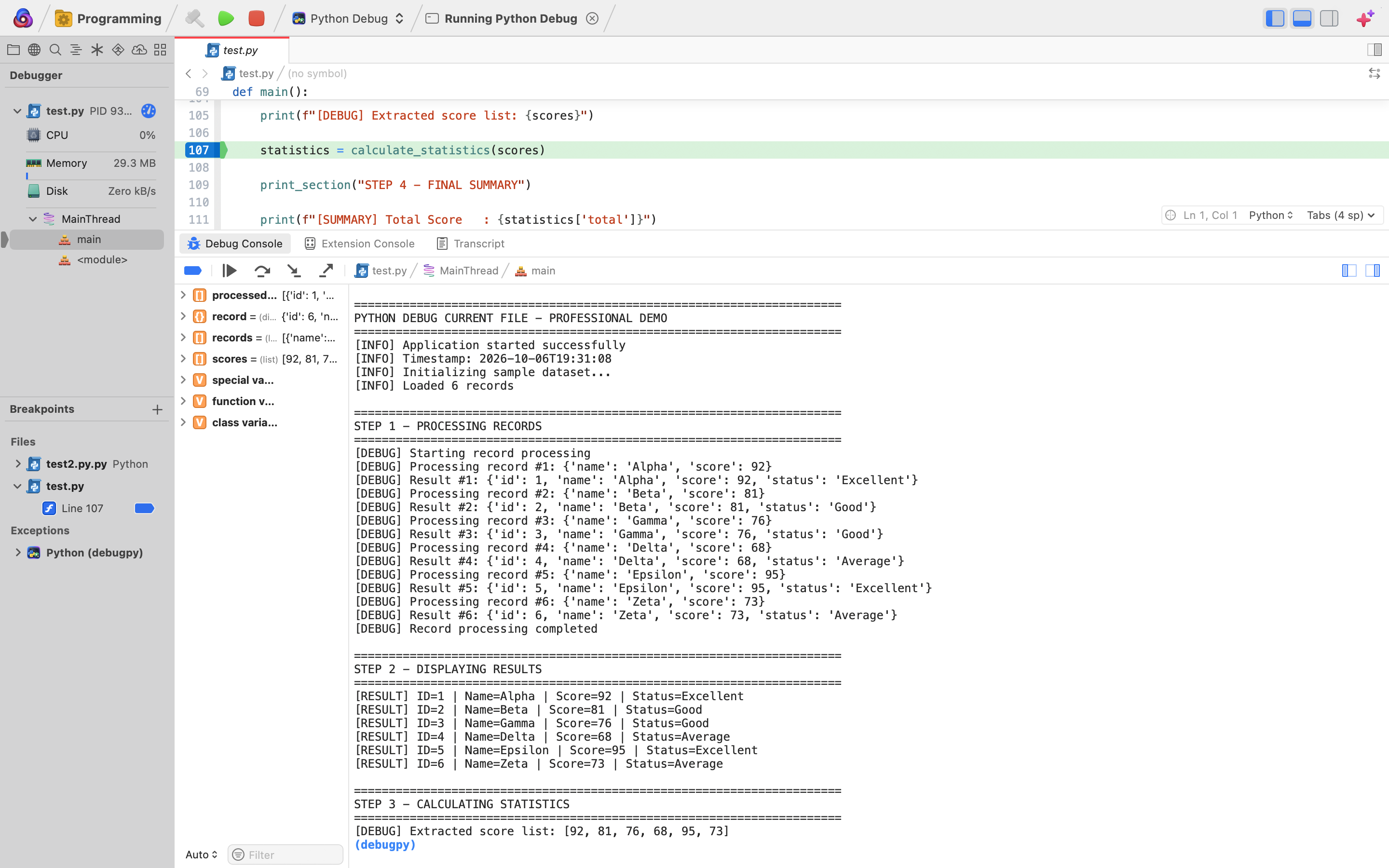
Debugging in Action
Debug the currently focused Python file using Nova's native debugging interface and debugpy.
Features
- Run Current Python File: Execute the currently focused
.pyfile directly from Nova. - Native Python Debugging: Debug Python files through Nova's native debugger using
debugpy. - Breakpoint Support: Add and use breakpoints directly from Nova's editor gutter.
- Dedicated Python Debug Task: Start debugging through Python Debug → Run ▶.
- Build-to-Debug Workflow: Use Python → Build 🔨 to launch the debugger for
.pyfiles. - JupyterLab Support: Launch JupyterLab for the currently focused
.ipynbnotebook. - Flexible Project Layout: Python and Jupyter files can be located anywhere in the Nova project.
- Environment-Based Resolution: Resolve
python3andjupyterthrough the user's system environment instead of relying on fixed installation paths. - Focused File Detection: Task behavior automatically adapts to
.pyand.ipynbfiles.
Feature Status
| Feature | Status | Usage |
|---|---|---|
| Python file execution | ✅ Supported | Python → Run ▶ |
| Python debugging | ✅ Supported | Python Debug → Run ▶ |
| Python debugging through Build | ✅ Supported | Python → Build 🔨 |
| Breakpoints | ✅ Supported | Nova editor gutter |
debugpy integration |
✅ Supported | Nova native debugger |
| JupyterLab launching | ✅ Supported | Python → Run ▶ on .ipynb |
Python files outside Python folder |
✅ Supported | Automatic |
Notebooks outside Jupyter folder |
✅ Supported | Automatic |
Environment-based python3 resolution |
✅ Supported | /usr/bin/env |
Environment-based jupyter resolution |
✅ Supported | /usr/bin/env |
| Advanced interpreter selection | 🔧 Planned | Future update |
| Virtual-environment selector | 🔧 Planned | Future update |
Status Legend
- ✅ Supported — available in the current release.
- 🔧 Planned — intended for a future release.
Requirements
The following tools must be available on your Mac:
python3for running Python filesdebugpyinstalled in the Python environment used bypython3jupyter/ JupyterLab for notebook support
The extension resolves Python and Jupyter through your system environment, so it does not depend on a specific Python installation path.
Verify your setup
Run:
python3 --version
python3 -m debugpy --version
jupyter --version
Python may be installed using the official Python installer, Homebrew, pyenv, Conda, or another method, provided python3 is available through your environment.
Setup in Nova
Add the Python task
The Python task is provided as a Nova Task Template.
For each project where you want to use it:
- Open Project → Project Settings
- Select Tasks
- Click the + button
- Add the Python task provided by this extension
The Python Debug task is provided dynamically by the extension and can be used directly for debugging.
Usage
Run a Python file
- Open or focus any
.pyfile in Nova. - Select the Python task.
- Click Run ▶.
The extension runs the currently focused Python file using python3.
The file does not need to be inside a folder named Python.
Debug a Python file
There are two supported debugging workflows.
Python Debug task
- Open or focus the
.pyfile you want to debug. - Add one or more breakpoints in Nova's editor gutter.
- Select Python Debug from the task menu.
- Click Run ▶.
Nova starts a debugging session using debugpy.
Python task Build action
You can also:
- Open or focus a
.pyfile. - Select the Python task.
- Click Build 🔨.
For Python files, the Build action starts the debugger.
Jupyter
To launch JupyterLab:
- Open or focus an
.ipynbfile. - Select the Python task.
- Click Run ▶.
The extension launches JupyterLab with the notebook's containing folder as the working directory.
The notebook does not need to be inside a folder named Jupyter.
Jupyter and the Build button
The Build 🔨 action is reserved for debugging Python .py files.
If Build is used while an .ipynb file is focused, the extension displays a message telling you to use Run ▶ to launch JupyterLab instead.
This behavior is intentional.
Permissions
Python Run and Debug requests only the Nova entitlement required for its current functionality.
Launch Subprocesses
The extension uses Nova's Launch Subprocesses permission to start:
python3for Python executionpython3 -m debugpy.adapterfor debuggingjupyter labfor notebook workflows
The extension does not currently request general filesystem, clipboard, or network entitlements.
Current Status
Python Run and Debug resolves python3 and jupyter through the user's system environment instead of relying on a fixed Python installation path.
Python .py files and Jupyter .ipynb notebooks can be used from any folder in the Nova project.
The current release has been tested successfully for:
- Running Python files
- Debugging Python files with breakpoints
- Debugging using
debugpy - Launching JupyterLab from
.ipynbfiles - Running Python files outside a dedicated
Pythonfolder - Debugging Python files outside a dedicated
Pythonfolder - Launching notebooks outside a dedicated
Jupyterfolder
Planned Improvements
- Better virtual-environment support
- Advanced Python interpreter selection
- Additional compatibility testing across Python installation methods
- Further task workflow refinements
- Further Jupyter workflow refinements
Troubleshooting
A dedicated Help page is included with the extension.
Open the extension in Nova's Extension Library and select the Help tab for:
- setup instructions
- disabled Run button troubleshooting
- missing
python3 - missing
debugpy - missing Jupyter
- breakpoint troubleshooting
- task setup guidance
- development-extension troubleshooting
Contributing
Bug reports, compatibility reports, and feature suggestions are welcome.
If you encounter a problem, please include:
- your macOS version
- your Nova version
- your Python installation method
- output from
python3 --version - output from
python3 -m debugpy --version - output from
jupyter --version - the relevant Nova Extension Console error, if available
Use the extension's Bug Reports link or GitHub Issues:
https://github.com/utkarsh-data-enthusiast/nova-python-debug-current-file/issues
Repository
Source code:
https://github.com/utkarsh-data-enthusiast/nova-python-debug-current-file
License
Python Run and Debug is released under the MIT License.
See the included LICENSE file for details.
Author
PatriotEver Lab
Release Notes
2.0
Added
- Added smart Python and Jupyter task routing based on the focused file.
- Added JupyterLab support for
.ipynbnotebooks anywhere in the project. - Added automatic Jupyter mode for non-Python files inside the
Jupyterfolder. - Added Python execution for
.pyfiles inside both thePythonandJupyterfolders. - Added Python debugging for
.pyfiles inside both thePythonandJupyterfolders. - Added JupyterLab launch support from both Run and Build/Hammer while in Jupyter mode.
- Added direct opening of the focused
.ipynbnotebook in JupyterLab. - Added the separate
Python Debugtask for clean debugging through Nova's Run action.
Changed
- Standardized Python execution and debugging on Python 3.14.
- Jupyter mode now gives
.ipynbfiles priority regardless of their folder. .pyfiles inside theJupyterfolder now behave as normal Python files.- The smart task remains named
Python.
Fixed
- Fixed
env: jupyter: No such file or directory. - Fixed JupyterLab failing to launch from the smart Python task.
- Fixed non-notebook files inside
Jupyter/not activating Jupyter mode. - Improved remembered-file handling when Nova task reports temporarily take editor focus.
Behavior
Python/*.py: Run executes Python; Hammer debugs Python.Python/*.ipynb: Run or Hammer launches JupyterLab.Jupyter/*.py: Run executes Python; Hammer debugs Python.Jupyter/*.ipynb: Run or Hammer launches JupyterLab.- Other files inside
Jupyter/: Run or Hammer launches JupyterLab.
Version 1.9
Extension Naming and User Experience
- Renamed the extension from Python Debug Current File to Python Run and Debug to better reflect its functionality.
- Updated the extension description to highlight Python Run, Python Debug, and JupyterLab support.
- Updated current user and contributor documentation to use the new extension name.
- Kept the extension identifier unchanged to preserve update compatibility.
Version 1.8
Metadata and Documentation
- Corrected and validated the Nova extension manifest.
- Added a minimum Nova runtime requirement of version 9.0.
- Added comprehensive contributor documentation describing the extension architecture, testing, and release workflow.
- Updated the README release badge for version 1.7.
- Retained the MIT License, Help documentation, Python debugging, and Jupyter support.
Version 1.7
Metadata Fixes
- Corrected the Nova extension manifest format.
- Updated the bug-reporting metadata to use the supported Bug Reports URL format.
- Fixed extension submission validation issues.
- Retained the MIT License and Help documentation introduced in version 1.6.
Version 1.6
Professional Presentation
- Added MIT License metadata and a complete MIT
LICENSEfile. - Added dedicated Nova Help documentation with setup and troubleshooting guidance.
- Added a professional feature-status table and status legend.
- Expanded README documentation for permissions, troubleshooting, contributing, and supported workflows.
- Added polished Nova Extension, release, and license badges.
- Improved Extension Library presentation and documentation consistency.
Version 1.5
Documentation
- Moved the Python debugging demonstration image to the extension root for a cleaner project structure.
- Removed the now-unneeded documentation folder.
- Fixed the debugging demonstration image URL used in the Nova Extension Library Details page.
Version 1.4
Portability and Compatibility
- Removed the hard-coded Python 3.14 installation path.
- Python is now resolved through the user's system environment using
python3. - Jupyter is now resolved through the user's system environment using
jupyter. - Python files no longer need to be inside a folder named
Python. - Jupyter notebooks no longer need to be inside a folder named
Jupyter. - JupyterLab now launches using the focused notebook's actual containing folder as its working directory.
- Updated task logic to detect Python and Jupyter files by
.pyand.ipynbfile extensions.
Python Debugging
- Confirmed Python debugging works outside dedicated Python folders.
- Continued using
debugpywith Nova's native debugging interface. - Improved error messages for unsupported or unfocused files.
Documentation
- Added a real screenshot demonstrating Python debugging with breakpoints, variables, debug output, and
debugpy. - Expanded setup instructions for adding the Python Task Template to Nova projects.
- Added clearer Run, Debug, Build, and Jupyter usage instructions.
- Updated requirements to reflect environment-based Python and Jupyter detection.
- Documented the intentional Build behavior for Jupyter notebooks.
- Updated current-status and planned-improvements documentation.
Version 1.3
Documentation Improvements
- Replaced the default Nova README template with documentation written specifically for Python Debug Current File.
- Removed the unrelated Playdate screenshot.
- Removed misleading Node.js and NPM requirements.
- Added usage instructions for Python Run, Python Debug, and Jupyter support.
- Added compatibility notes and planned improvements.
Version 1.2
Support and Project Links
- Added the public GitHub repository.
- Added GitHub Issues as the primary bug-reporting and feature-request channel.
- Added a private support email address to the extension's bug-reporting metadata.
Version 1.1
Initial Release
- Added the smart Python Task Template.
- Added Python file execution from Nova.
- Added Python debugging using
debugpy. - Added breakpoint support.
- Added the dedicated Python Debug task.
- Added JupyterLab launching support.
- Added integration with Nova's Run and Build task actions.
License
MIT License
Copyright (c) 2026 PatriotEver Lab
Permission is hereby granted, free of charge, to any person obtaining a copy
of this software and associated documentation files (the "Software"), to deal
in the Software without restriction, including without limitation the rights
to use, copy, modify, merge, publish, distribute, sublicense, and/or sell
copies of the Software, and to permit persons to whom the Software is
furnished to do so, subject to the following conditions:
The above copyright notice and this permission notice shall be included in all
copies or substantial portions of the Software.
THE SOFTWARE IS PROVIDED "AS IS", WITHOUT WARRANTY OF ANY KIND, EXPRESS OR
IMPLIED, INCLUDING BUT NOT LIMITED TO THE WARRANTIES OF MERCHANTABILITY,
FITNESS FOR A PARTICULAR PURPOSE AND NONINFRINGEMENT. IN NO EVENT SHALL THE
AUTHORS OR COPYRIGHT HOLDERS BE LIABLE FOR ANY CLAIM, DAMAGES OR OTHER
LIABILITY, WHETHER IN AN ACTION OF CONTRACT, TORT OR OTHERWISE, ARISING FROM,
OUT OF OR IN CONNECTION WITH THE SOFTWARE OR THE USE OR OTHER DEALINGS IN THE
SOFTWARE.
Help
Python Run and Debug — Help
Use this page for setup, usage, and troubleshooting.
Quick Start
Run a Python file
- Open or focus a
.pyfile in Nova. - Select the Python task.
- Click Run ▶.
The extension runs the currently focused Python file using python3.
Debug a Python file
- Open or focus a
.pyfile. - Add one or more breakpoints in Nova's editor gutter.
- Select Python Debug.
- Click Run ▶.
Nova starts a debugging session using debugpy.
You can also select the Python task and use the Build 🔨 action to start debugging.
Launch JupyterLab
- Open or focus an
.ipynbnotebook. - Select the Python task.
- Click Run ▶.
JupyterLab launches using the notebook's containing folder as its working directory.
The notebook does not need to be inside a folder named Jupyter.
Requirements
The following commands must be available through your system environment:
python3 --version
python3 -m debugpy --version
jupyter --version
Required tools:
python3debugpyjupyter/ JupyterLab
Adding the Python Task
The Python task is provided as a Nova Task Template.
To add it to a project:
- Open Project → Project Settings
- Select Tasks
- Click the + button
- Select Python
The Python Debug task is provided dynamically by the extension and does not need to be manually created.
Troubleshooting
Run button is disabled
Check that:
- the extension is installed and enabled
- the Python task has been added to the project
- a
.pyor.ipynbfile is focused - the currently selected task is appropriate for the focused file
If you are testing a local development copy of the extension, make sure the extension project has been activated using:
Extensions → Activate Project as Extension
Python cannot be found
Open Terminal and run:
python3 --version
If the command is unavailable, install Python and ensure python3 is available through your system environment.
The extension does not rely on a hard-coded Python installation path.
debugpy cannot be found
Check whether debugpy is available:
python3 -m debugpy --version
If debugpy is missing, install it into the Python environment used by python3:
python3 -m pip install debugpy
Then verify again:
python3 -m debugpy --version
Jupyter cannot be found
Check whether Jupyter is available:
jupyter --version
If it is unavailable, install JupyterLab into the Python environment you want to use:
python3 -m pip install jupyterlab
Then verify:
jupyter --version
Jupyter Build Failed message
The Build 🔨 action is reserved for debugging Python .py files.
When an .ipynb file is focused, use:
Python → Run ▶
to launch JupyterLab.
This behavior is intentional.
Wrong Python interpreter
The current release resolves python3 through the user's system environment.
This makes the extension independent of one fixed Python installation path.
More advanced interpreter and virtual-environment selection is planned for a future update.
Breakpoint is not reached
Check that:
- the breakpoint is placed on executable Python code
- the focused file is the file you intend to debug
debugpyis installed in the Python environment used bypython3- you started either the Python Debug task or the Python → Build 🔨 action
Python Debug task is available but Python task is missing
The two tasks are provided differently.
Python Debug is provided dynamically by the extension.
The Python task is a Nova Task Template and must be added to each project where you want to use it:
- Open Project → Project Settings
- Select Tasks
- Click +
- Add Python
Python or Jupyter file is outside its usual folder
That is supported.
Python files do not need to be inside a folder named:
Python
Jupyter notebooks do not need to be inside a folder named:
Jupyter
The extension detects supported files by their extensions:
.py→ Python.ipynb→ Jupyter
Extension Console
For development or extension-level errors, open Nova's Extension Console and look for messages from:
Python Run and Debug
The Extension Console can help diagnose:
- task-resolution errors
- extension activation errors
- JavaScript errors
- debugging setup problems
Supported Workflows
| Feature | Status | Action |
|---|---|---|
| Python file execution | ✅ Supported | Python → Run ▶ |
| Python debugging | ✅ Supported | Python Debug → Run ▶ |
| Python debugging through Build | ✅ Supported | Python → Build 🔨 |
| Breakpoints | ✅ Supported | Nova editor gutter |
debugpy integration |
✅ Supported | Native Nova debugger |
| JupyterLab launching | ✅ Supported | Python → Run ▶ on .ipynb |
Python files outside Python folder |
✅ Supported | Automatic |
Notebooks outside Jupyter folder |
✅ Supported | Automatic |
Environment-based python3 resolution |
✅ Supported | /usr/bin/env |
Environment-based jupyter resolution |
✅ Supported | /usr/bin/env |
| Advanced interpreter selection | 🔧 Planned | Future update |
| Virtual-environment selector | 🔧 Planned | Future update |
Permissions
Launch Subprocesses
Python Run and Debug requires Nova's Launch Subprocesses permission.
This permission is used to launch:
python3debugpyjupyter
The extension does not require general filesystem read/write access for its current task functionality.
Bug Reports
Bug reports and feature requests can be submitted through the extension's Bug Reports link in Nova's Extension Library.
GitHub Issues:
https://github.com/utkarsh-data-enthusiast/nova-python-debug-current-file/issues
Repository
Source code:
https://github.com/utkarsh-data-enthusiast/nova-python-debug-current-file
License
Python Run and Debug is released under the MIT License.
See the LICENSE file included with the extension.
Author
PatriotEver Lab