Extension Details

- Tinyfy
- by Feisar
- 13 Recent Installs | 245 Total Installs
- Automatically minify local CSS & JS files on save using Lightning CSS and Terser.
- Repository
- Bug Reports
-
 Read & Write Files
-
 Launch Subprocesses
-
This extension is allowed to:
Readme
Tinyfy Extension for Nova v1.6
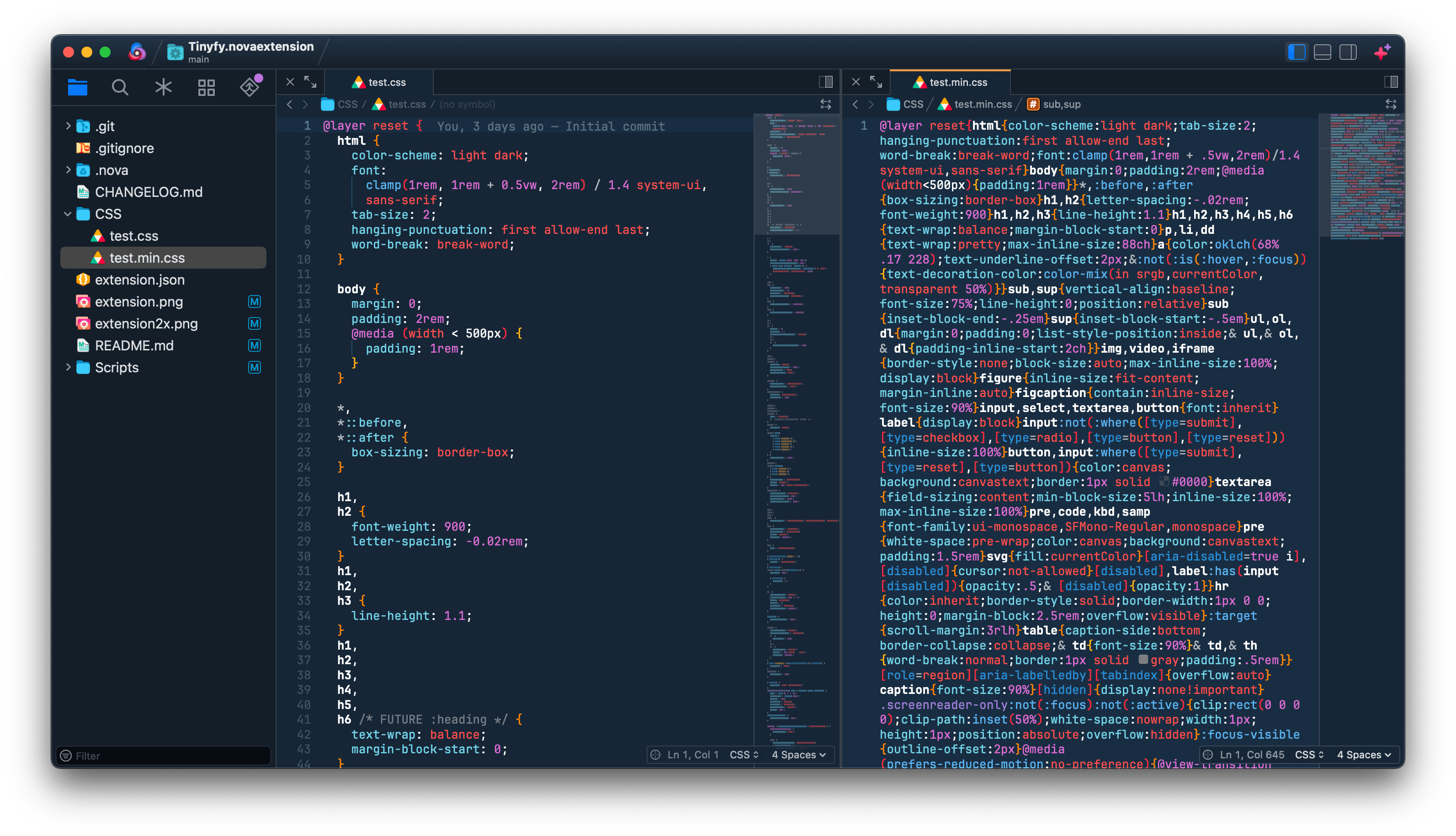
Tinyfy is an extension for the Nova code editor from Panic, that automatically minifies local .js and .css files on save, using Terser for JS minification and Lightning CSS for CSS minification.
Terser and Lightning CSS are both up-to-date and supported CLI tools. Alternatives such as uglifycss, csso and uglify-js are deprecated.
Tested with Nova 13.x on macOS Sequoia 15.7.x
Features
- Automatically checks for Node, Terser, and Lightning CSS on activation, and prompts for installation if needed
- Shows the time taken and how many bytes were saved during minification
- Alerts you when an error occurs parsing a file and attempts to jump the editor to the line and column of the error
- Alerts you when minification is skipped for remote files
- Lets you disable JS and CSS minification separately
- Checkboxes for common Terser and Lightning CSS flags in the extension Settings
- Additional flags can be appended via a string setting in the extension Settings
- Allows you to customise the minified file extension (e.g.
.min.jsor.min.css) - Skips files that are already minified
- Provides detailed logging in the Extension Console for every action
Screenshot
Requirements
Tinyfy requires some additional tools to be installed on your Mac:
- Current version of Node.js and NPM
- Terser to minify JavaScript
- Lightning CSS CLI package to minify CSS
Installation
Installing Node.js and NPM
Follow your preferred installation method here: https://nodejs.org/en/download
Installing Lightning CSS standalone CLI
From the command line, enter:
npm install lightningcss-cli -g
Installing Terser
From the command line, enter:
npm install terser -g
Installing Tinyfy
- Relaunch Nova after installing Node, Terser and Lightning CSS
- In Nova, navigate to Extensions > Extension Library...
- Search for "Tinyfy"
- Click the Install button
Using Tinyfy
When Tinyfy is active, it automatically minifies local .js and .css files on save, adding a .min prefix to the filename extension.
To avoid conflicts, it’s best to disable any other Nova extensions that also handle minification.
You can tweak the file extension or turn off minification entirely in the Extension settings.
Configuration
To configure global settings, open Extensions → Extension Library... then select Tinyfy's Settings tab.
- You can disable JS or CSS minification by unchecking the corresponding checkbox
- You can change the filename extension of minified files by updating the Output Suffix text box
- Both minifiers expose their most common options as simple toggles in Settings (e.g. compress/mangle for Terser, nesting/custom-media for Lightning CSS), plus a free-text field for any additional CLI flags not covered by those toggles - giving full control without needing new settings for every possible option.
Limitations
The Nova Extensions API does not allow creating or manipulating remote files for security reasons, therefore Tinyfy cannot minify remote files. When saving a remote JS or CSS file Tinyfy will notify you that minification has been skipped.
Release Notes
Version 1.6 (31st August 2026)
- Removed the now redundant code and Setting option to strip the trailing newline from the output since switching to file-based I/O (thanks mbeekhuis)
Version 1.5 (27th August 2026)
- Fixed an issue where minifying certain JavaScript files could hang indefinitely - Terser now reads and writes via file paths instead of piping the source through stdin (thanks mbeekhuis)
- Removed some redundant code
Version 1.4 (19th July 2026)
- Added configurable Terser flags (thanks mbeekhuis)
- Added option to remove the trailing newline Terser's CLI appends to minified output (thanks mbeekhuis)
- Added configurable Lightning CSS flags
- Now logs the full CLI invocation for each minifier to the Extension Console
Version 1.3 (11th July 2026)
- Code optimisations and enhancements
- Fix extension not activating for CSS files if a JS file is not present (thanks swinggraphics)
Version 1.2 (2nd January 2026)
- A notification is no longer shown when saving non-CSS or JS files on a remote server
- Updated README to explain extension limitations
Version 1.1 (24th October 2025)
- If an error occurs while parsing a file, a notification will show the line and column numbers where the error occurred, and the editor will try to jump to that location in the file
- Improved the extension icon on retina displays and optimised file size
Version 1.0 (21st October 2025)
- Initial release