Extension Details
- PowerShell
- by Kainor LLC
- 1 Recent Installs | 1 Total Installs
- PowerShell 7 support: syntax highlighting, completions, diagnostics, formatting, tasks, and debugging.
- Repository
- Bug Reports
-
 Read & Write Files
-
 Launch Subprocesses
-
This extension is allowed to:
Readme
PowerShell brings full PowerShell 7 support to Nova: accurate syntax highlighting, completions, live diagnostics, formatting, tasks, and a debugger.
Features
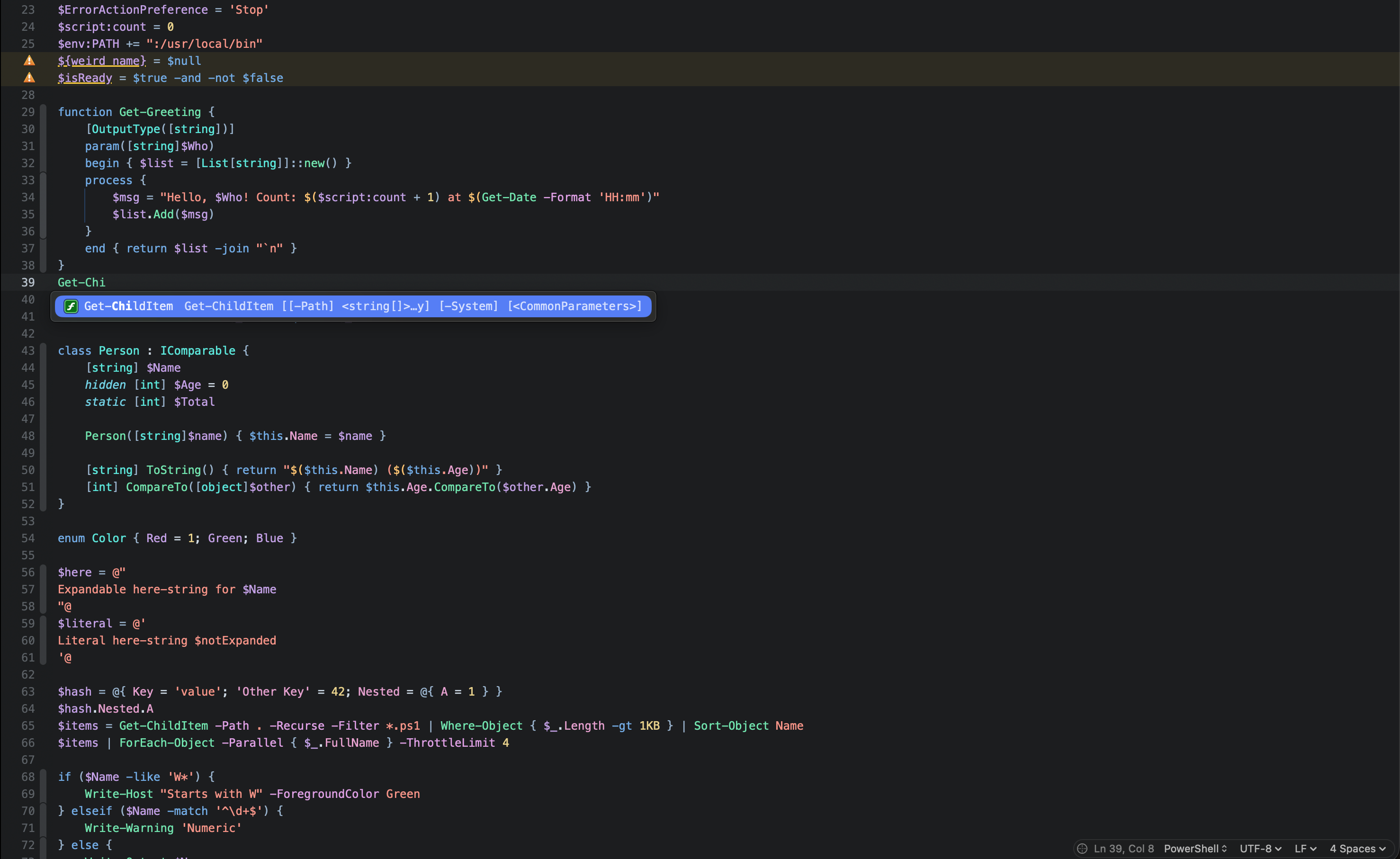
Editing
- Syntax highlighting built on Tree-sitter, including PowerShell 7 syntax (
? :,??,??=,?.), classes, enums, here-strings, and string interpolation - Comment-based help keywords (
.SYNOPSIS,.PARAMETER Name, …) highlighted inside<# … #>comments - Code folding for blocks, comment-based help, here-strings, and
#region/#endregion - Symbols sidebar with functions, classes, methods, properties, enums, and regions
- Snippets for advanced functions, comment-based help, control flow, classes, splatting, and Pester (type
function,help,foreach,try,Describe, …)
Language features
Powered by PowerShell Editor Services, the engine behind the official VS Code extension (bundled, no setup needed):
- Completions for commands, parameters, variables, and .NET types
- Hover help and parameter hints
- Jump to Definition and Jump to References
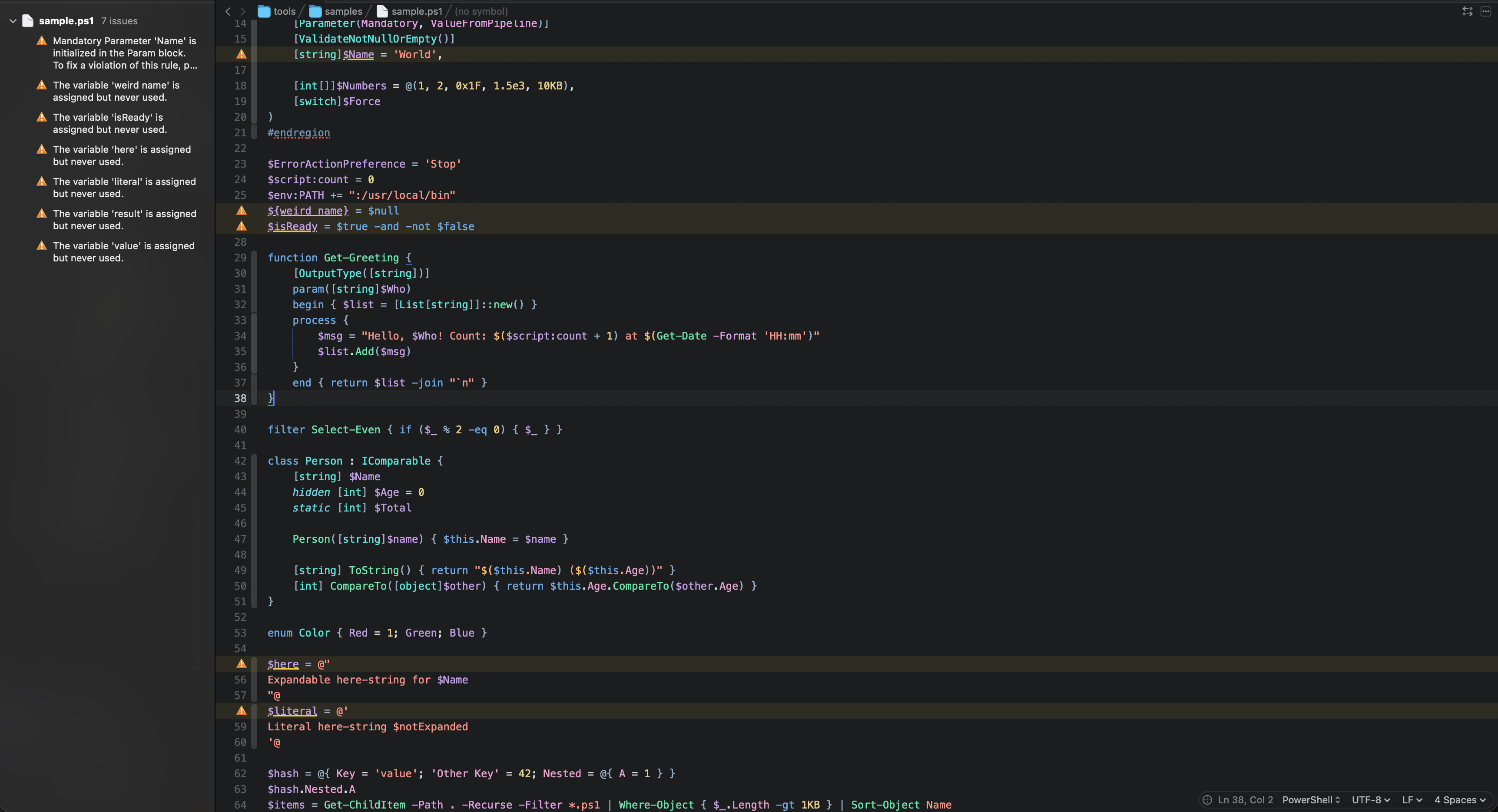
- Live diagnostics from PSScriptAnalyzer
- Format Document and Format Selection (Editor menu), with optional format on save
- Rename Symbol for functions and variables in the current file (Editor menu)
- Show Help for Command: full
Get-Helpoutput for the command under the cursor (Editor menu) - Run Selection in PowerShell: runs the selected lines (or the current line) and shows the output in a new tab (Editor menu)
Module manifests
- Completions for manifest keys (with descriptions) and known values such as
CompatiblePSEditionsandProcessorArchitecture;GUIDis generated for you. In an empty.psd1, typemanifestfor a complete skeleton. - Checks on save:
Test-ModuleManifestproblems appear in the Issues sidebar on the key they concern, plus warnings forFunctionsToExportentries that aren't defined and a hint for functions that are defined but not exported. Module files are parsed, never run. - New Module Manifest… (Extensions menu) creates a module folder with a manifest and an empty
.psm1.
Tasks
Available from the task menu in the toolbar:
- Run Current Script and Run Current Script with Arguments…
- Debug Current Script and Debug Current Script with Arguments…
- Run Pester Tests, and Run Pester Test at Cursor to run just the
It,Context, orDescribeblock the cursor is in
Errors and failed tests appear in the Issues sidebar with their file and line. For a reusable setup, add a PowerShell Script, PowerShell Debug, or Pester Tests task in Project Settings → Tasks.
Debugging
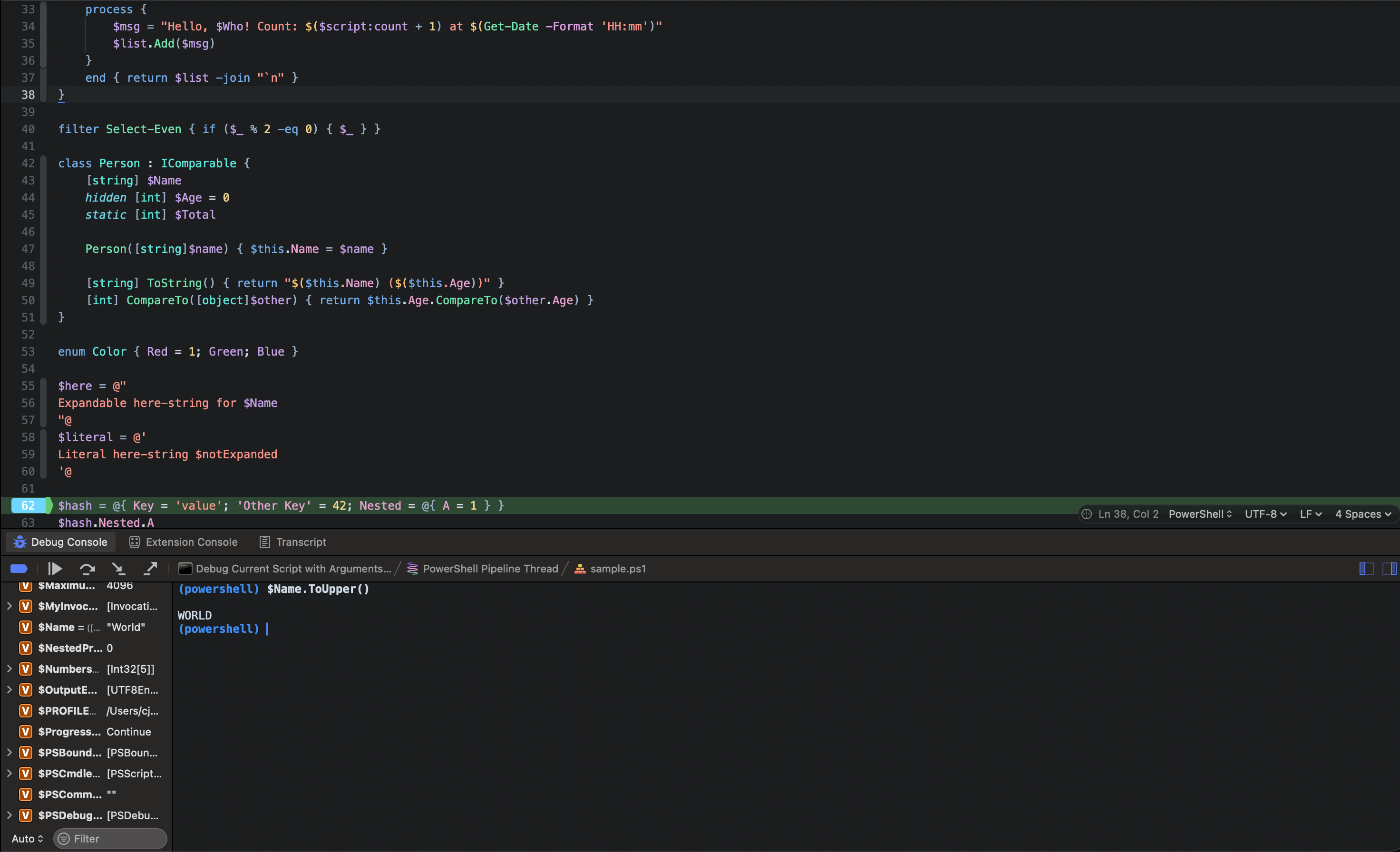
Click the line-number gutter to set a breakpoint, then choose Debug Current Script. You get the call stack, variables, stepping, and a debug console where you can evaluate expressions. Script output appears in the debug console.
Requirements
Syntax highlighting, folding, symbols, and snippets work out of the box. Language features, tasks, and debugging need PowerShell 7 or later:
brew install powershell
The extension finds pwsh automatically. If it's installed somewhere unusual, set its path in the extension preferences.
To run Pester tests, install Pester 5 or later:
Install-Module Pester -Scope CurrentUser
If you have the older io.jah.PowerShell extension installed, disable it to avoid two PowerShell syntaxes competing.
Works on Apple Silicon and should work on Intel Macs (the syntax parser is built for both), though it has only been tested on Apple Silicon.
Preferences
In Extensions → Extension Library → PowerShell → Settings:
- PowerShell Path: leave empty to detect automatically
- Enable PSScriptAnalyzer and a custom PSScriptAnalyzerSettings.psd1 file (also settable per project)
- Formatting: format on save, brace style,
} else {placement, pipeline indentation, cmdlet casing, and alias expansion
Known limitations
Read-Hostand other console input don't work while running or debugging scripts from a task, since tasks have no console input.- Rename Symbol only changes the current file.
- Debugging needs the language server to be running (it is, unless you turn it off in preferences).
Troubleshooting
- Extensions → Restart Language Server restarts PowerShell Editor Services.
- Extensions → Show Language Server Logs opens the log folder.
- Turn on Log Language Server and Debugger Traffic in the preferences to record detailed logs when reporting a bug.
Please report issues at github.com/Kainor-LLC/nova-powershell.
If this extension saves you time, you can buy me a coffee.
License
Free for anyone to use, including at work. Source is on GitHub under the MIT License with the Commons Clause, which doesn't allow selling it or products and services based substantially on it. Bundled components from Microsoft and the Tree-sitter grammar keep their own MIT licenses.
Release Notes
Version 1.1.0
- New: Run Pester Test at Cursor task runs only the test block the cursor is in
- New: comment-based help keywords are highlighted inside
<# … #>comments - Fixed: the language server could fail to start after a restart or reactivation ("Another instance ... is already running"); stopping is now immediate instead of taking 15 seconds, and starting retries while an old instance finishes
- Fixed: preferences set before startup are now applied (the first settings message could arrive before the server was ready and be dropped)
- New: module manifest (.psd1) support: completions for keys and values, checks on save with
Test-ModuleManifestandFunctionsToExportverification, and a New Module Manifest… command
Version 1.0.2
- New: Run Selection in PowerShell (Editor menu) runs the selected lines or the current line and shows the output
- Fixed: highlighting error for backtick escapes inside unquoted arguments, like
Write-Host foo`nbar - Fixed: license page formatting in the Extension Library
- Fixed: "Another instance of PowerShell Editor Services is already running" error when changing preferences such as PowerShell Path
Version 1.0.1
- License changed to MIT with the Commons Clause: still free to use, modify, and contribute to, but not to resell.
Version 1.0.0
Initial release.
- Tree-sitter syntax highlighting, code folding, and symbols, including PowerShell 7 syntax
- Completions, hover help, parameter hints, Jump to Definition, and Jump to References through PowerShell Editor Services
- PSScriptAnalyzer diagnostics
- Format Document, Format Selection, and format on save
- Rename Symbol and Show Help for Command
- Snippets for functions, help, control flow, classes, splatting, and Pester
- Run Current Script, Run with Arguments, and Run Pester Tests tasks, with errors in the Issues sidebar
- Debugging with breakpoints, stepping, variables, call stack, and a debug console
License
"Commons Clause" License Condition v1.0
The Software is provided to you by the Licensor under the License, as defined
below, subject to the following condition.
Without limiting other conditions in the License, the grant of rights under
the License will not include, and the License does not grant to you, the right
to Sell the Software.
For purposes of the foregoing, "Sell" means practicing any or all of the rights
granted to you under the License to provide to third parties, for a fee or
other consideration (including without limitation fees for hosting or
consulting/ support services related to the Software), a product or service
whose value derives, entirely or substantially, from the functionality of the
Software. Any license notice or attribution required by the License must also
include this Commons Clause License Condition notice.
Software: PowerShell for Nova (kainorllc.PowerShell)
License: MIT
Licensor: Kainor LLC
The Commons Clause condition and the MIT License below cover the code written
by Kainor LLC in this extension. The third-party components listed after them
are distributed under their own licenses, without the Commons Clause.
MIT License
Copyright (c) 2026 Kainor LLC
Permission is hereby granted, free of charge, to any person obtaining a copy
of this software and associated documentation files (the "Software"), to deal
in the Software without restriction, including without limitation the rights
to use, copy, modify, merge, publish, distribute, sublicense, and/or sell
copies of the Software, and to permit persons to whom the Software is
furnished to do so, subject to the following conditions:
The above copyright notice and this permission notice shall be included in all
copies or substantial portions of the Software.
THE SOFTWARE IS PROVIDED "AS IS", WITHOUT WARRANTY OF ANY KIND, EXPRESS OR
IMPLIED, INCLUDING BUT NOT LIMITED TO THE WARRANTIES OF MERCHANTABILITY,
FITNESS FOR A PARTICULAR PURPOSE AND NONINFRINGEMENT. IN NO EVENT SHALL THE
AUTHORS OR COPYRIGHT HOLDERS BE LIABLE FOR ANY CLAIM, DAMAGES OR OTHER
LIABILITY, WHETHER IN AN ACTION OF CONTRACT, TORT OR OTHERWISE, ARISING FROM,
OUT OF OR IN CONNECTION WITH THE SOFTWARE OR THE USE OR OTHER DEALINGS IN THE
SOFTWARE.
Third-party software
Syntaxes/libtree-sitter-powershell.dylib is built from tree-sitter-powershell
(https://github.com/wharflab/tree-sitter-powershell, a fork of airbus-cert/tree-sitter-powershell):
MIT License
Copyright (c) 2023 Airbus CERT
Permission is hereby granted, free of charge, to any person obtaining a copy
of this software and associated documentation files (the "Software"), to deal
in the Software without restriction, including without limitation the rights
to use, copy, modify, merge, publish, distribute, sublicense, and/or sell
copies of the Software, and to permit persons to whom the Software is
furnished to do so, subject to the following conditions:
The above copyright notice and this permission notice shall be included in all
copies or substantial portions of the Software.
THE SOFTWARE IS PROVIDED "AS IS", WITHOUT WARRANTY OF ANY KIND, EXPRESS OR
IMPLIED, INCLUDING BUT NOT LIMITED TO THE WARRANTIES OF MERCHANTABILITY,
FITNESS FOR A PARTICULAR PURPOSE AND NONINFRINGEMENT. IN NO EVENT SHALL THE
AUTHORS OR COPYRIGHT HOLDERS BE LIABLE FOR ANY CLAIM, DAMAGES OR OTHER
LIABILITY, WHETHER IN AN ACTION OF CONTRACT, TORT OR OTHERWISE, ARISING FROM,
OUT OF OR IN CONNECTION WITH THE SOFTWARE OR THE USE OR OTHER DEALINGS IN THE
SOFTWARE.
Server/ contains PowerShell Editor Services, PSScriptAnalyzer, and PSReadLine
(MIT, © Microsoft Corporation). Their licenses and third-party notices are
included alongside them: LICENSE and NOTICE.txt in the Server folder, LICENSE
and ThirdPartyNotices.txt in the PSScriptAnalyzer version folder, and
License.txt in the PSReadLine version folder.