Extension Details

- Automatic Tasks
- by Little Green Man Ltd
- 228 Recent Installs | 8282 Total Installs
- Automatically offers Node (npm, yarn, pnpm, bun), Composer, Taskfile, Maidfile, just, Deno, Make, Laravel artisan and VS Code tasks as Nova Tasks.
- Repository
- Bug Reports
-
 Read & Write Files
-
 Launch Subprocesses
-
This extension is allowed to:
Readme
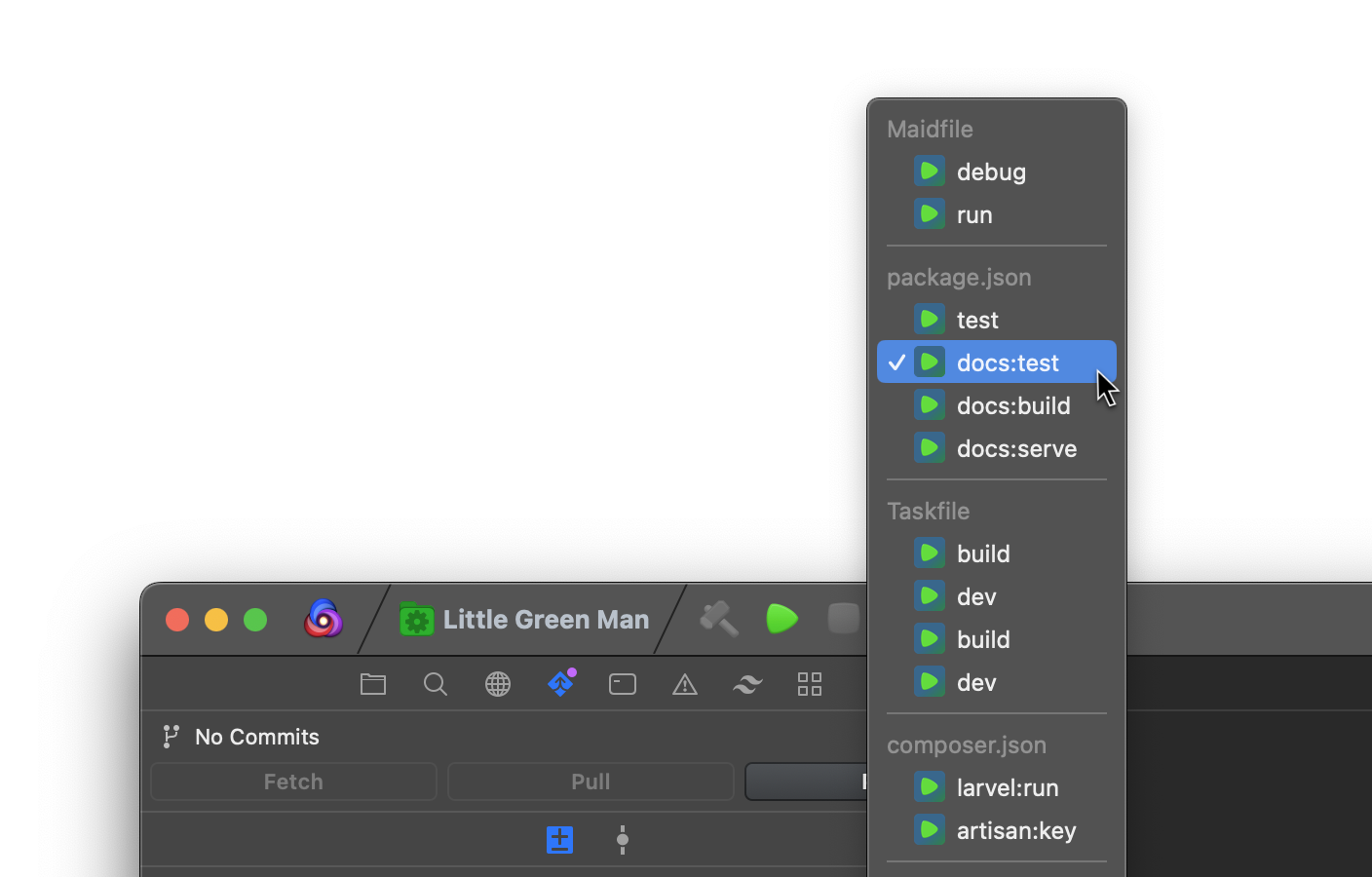
Your project's scripts, in Nova's Tasks menu.
Automatic Tasks reads your project's task runners and lists their scripts in Nova's Tasks menu, ready to run with ⌘R. Open a project and the tasks are there; change a file or a setting and the list updates.
Supported tools
| Source | Reads | Runs |
|---|---|---|
| Node | package.json scripts |
npm, yarn, pnpm or bun (run) |
| Composer | composer.json scripts |
composer run |
| Task | Taskfile.yml and its variants, including included Taskfiles |
task |
| Maid | maidfile, maidfile.toml, .yaml, .yml, .json |
maid |
| just | justfile or .justfile, including modules |
just |
| Deno | deno.json or deno.jsonc tasks |
deno task |
| Make | Makefile targets |
make |
| Laravel | artisan commands |
php artisan |
| VS Code | .vscode/tasks.json shell, process and npm tasks |
each task's own command |
Features
- Nothing to configure. Tasks are read from the project's own files, at the top level of the project, and refresh when those files change.
- Build and Clean shortcuts. Scripts named
buildorcompilealso run with Build (⌘B), andcleanwith Clean (⇧⌘K). - The right package manager. Node projects use npm, Yarn, pnpm or bun, detected from
packageManager,devEnginesor the lockfile, or chosen in Settings. - Monorepos. Optionally list tasks from npm, Yarn, pnpm, bun and Deno workspace packages, each run in its own folder.
- Only the tasks you run. Lifecycle hooks such as
postinstall, Composer events, private recipes and tasks that need arguments are left out. - Clear notifications. A missing tool, a broken file or a task list that hangs is explained, with a button to fix it: Install, Open File, Settings or Turn Off.
- VS Code tasks. Projects with a
.vscode/tasks.jsonget its tasks too, includingdependsOnand the open file's${file}and${fileDirname}. - A Tasks sidebar. Every task in one list: double-click to run, with live output and status.
- Global or per project. Every setting can be set once for all projects or overridden in Project Settings, and applies straight away.
Requirements
Each source needs its tool on your PATH: task (v3.19.1 or later), maid, just (1.15 or later), make or php to list tasks. Node, Composer and Deno tasks are read from their files, and need npm (or your package manager), composer or deno to run. For Maidfiles, use theMackabu's maid (cargo install maid); npm's maid package is an unrelated tool.
Note: listing Make targets (by default) and Laravel commands runs some of the project's own code: the Makefile's
$(shell …)and Laravel's service providers. For projects you don't trust, turn those sources off, or set Make to read the Makefile instead (see Make, below).
Tasks sidebar
The Tasks sidebar lists the same tasks as the Tasks menu, grouped by source. Show it like any other sidebar: it's listed alongside Files, Git and the rest.
- Double-click a task to run it, or right-click for Run, Stop and Show Output. Several tasks can run at once.
- Each task's icon and text show its status: running with the time so far, or how it finished ("✓ 3 s", "✗ exit 1", "stopped").
- Output streams into a log file named after the task, which opens when it starts. Close it whenever you like: Show Output opens it again. Each run replaces the last one's log, logs are cleared when the project is next opened, and a very long log (over 5 MB) keeps only its latest output.
- The header has Refresh and Stop All.
Nova doesn't let extensions start its own tasks, so the sidebar runs them itself. Those runs don't appear in Nova's task console or Issues, and the toolbar's Stop button doesn't stop them; use the sidebar's Stop instead. The Tasks menu and toolbar still work as before.
Settings
Set preferences in Extensions → Automatic Tasks → Settings. Project Settings has the same settings for one project: each starts on Use Global Setting, which follows your preferences and shows their current value, e.g. "Use Global Setting (On)".
Refresh Tasks (a button in both panes, and in the Extensions menu) re-reads every source. Use it after installing a missing tool, such as just or deno.
Task Sources
Turn each kind of task on or off. A source is only read when the project has its file at the top level. If the tool a source needs isn't installed, or its file has an error, a notification explains what to do.
Node and Composer
- Package Manager: Automatic uses the
packageManagerfield inpackage.json, thendevEngines.packageManager, then the lockfile (bun, pnpm, Yarn, then npm), and otherwise npm. Choose one to always use it. - Show Lifecycle Scripts: off by default. npm and Composer run some scripts for you: npm's install, publish and version hooks,
pre/postscripts for another script (when your package manager runs them), and Composer events such aspost-install-cmd. Turn this on to list them too.
Monorepos
- Workspace Packages: off by default. When on, tasks from workspace packages are listed as
<package>: <script>, e.g.@acme/api: build(or the folder, if a package has no name), and run in the package's folder with the project's package manager. - Workspaces are read from
package.jsonworkspaces(npm, Yarn, bun),pnpm-workspace.yamlpackagesanddeno.jsonworkspace. - Patterns can use
*,**and!exclusions;node_modulesand hidden folders are skipped. - A package's
buildandcleanscripts also run with Build and Clean.
Maid
- maid Path: leave empty to use
maidfrom yourPATH. If a differentmaidcomes first on yourPATH, set this to theMackabu's maid, e.g.~/.cargo/bin/maid. The "A different maid is installed" notification's Settings button opens this.
just
- Recipes That Ask to Confirm: recipes marked
[confirm]ask a question before running, which a Nova task can't answer. Hide leaves them out; Show, and confirm when run lists them and runs them withjust --yes.
Make
- Find Targets By:
- Asking make (the default) uses make's own list, so it finds every target, including those in included files. To do this, make evaluates the Makefile, running any
$(shell …)in it. - Reading the Makefile reads the Makefile and the files it includes by name, and runs nothing.
- Either way,
.PHONYtargets are listed if the Makefile declares any; otherwise, targets that look like names rather than files or patterns.
Laravel
- Artisan Commands:
- Common lists everyday commands (
serve,test,migrate,migrate:fresh,migrate:rollback,migrate:status,db:seed,queue:work,queue:listen,schedule:work,schedule:run,pail,optimize,optimize:clear,route:list,about,storage:link) plus everyapp:command. - All lists every command that needs no arguments.
- Commands that need a terminal (
tinker,dev) are never listed. - Listing starts the Laravel app, which runs your project's code; turn the source off for projects you don't trust.
VS Code
Tasks come from .vscode/tasks.json (comments and trailing commas are fine):
- Types:
shellandprocesstasks run their command and arguments;npmtasks run their script with the project's package manager (see Package Manager, above), inpathif given. Types from VS Code extensions (gulp, grunt, TypeScript…) are skipped. - Build group: tasks in the
buildgroup also run with Build (⌘B). - Options:
options.cwdandoptions.env, top-level defaults andosxoverrides apply. Tasks withhide: truearen't listed, but still run as dependencies. dependsOn: dependencies run first, together (parallel, the default) or one after another ("dependsOrder": "sequence"), then the task's own command. A failure stops the rest.- Variables:
${workspaceFolder},${workspaceFolderBasename},${userHome},${env:NAME}and${/}are filled in when tasks are listed. Tasks using the open file (${file},${fileDirname},${relativeFile},${lineNumber},${selectedText}and the like) are filled in when they run, from the frontmost editor; with no file open, they say so. Tasks using${command:…},${config:…}or${input:…}need VS Code, so they're skipped.
Skipped tasks are listed, with the reason, in the Extension Console.
Feedback and source code
Automatic Tasks is open source under the MIT licence. Bug reports, ideas and pull requests are welcome on GitHub, where you'll also find planned work and known issues.
Acknowledgements
Made by Little Green Man, with thanks to:
Questions or feedback: Elliot, on Mastodon (@elliot@rtsn.dev) or Bluesky (@elliotali.com), or hello [at] lgm.ltd.
Release Notes
Version 7.5
- VS Code tasks: projects with a
.vscode/tasks.jsonget itsshell,processandnpmtasks, withdependsOn, top-level defaults,osxoverrides and the build group (⌘B). Variables such as${workspaceFolder}are filled in, and the open file's (${file},${fileDirname}…) when the task runs. Tasks that need VS Code itself are skipped (#10) - Tasks sidebar: every task in one list, grouped by source. Double-click to run; each task shows its status in its icon, and output streams into a log file named after the task, with Stop and Stop All. Several can run at once (#11)
- Needs Nova 12 or later
- The extension now asks for write access to files, only to save the sidebar's output logs in Nova's storage for the extension
Version 7.4.1
- A clearer extension page: the Extension Library description has been rewritten, with a table of supported tools, a feature list, the tools each source needs and a tidier Settings guide
- For contributors: the GitHub README has a step-by-step guide to adding a new task source, with a worked example
Version 7.4
- Monorepos: a new Workspace Packages setting (off by default) also lists tasks from workspace packages, named
<package>: <script>and run in the package's folder. It reads npm, Yarn and bunworkspaces,pnpm-workspace.yamland Denoworkspacemembers, with*,**and!patterns - maid Path setting, to use theMackabu's maid when another
maidcomes first on yourPATH; the maid notifications have a Settings button for it - Tasks menu headings now match the settings' names, e.g. "Node (package.json)", "Laravel (artisan)"
Version 7.3
- Internal: moved to TypeScript 7, and tightened types for the files and tool output each source reads (a just recipe without a name is now skipped rather than listed as "undefined")
- No changes to how the extension behaves
Version 7.2.1
- Fixed: a tool that hangs while listing tasks (for example
makeasking to install Apple's command-line tools, or a Laravel app waiting on its database) is now stopped after 15 seconds, with a notification offering Refresh, instead of that source's tasks never appearing - Listing processes still running are stopped when the extension stops
- A problem that's fixed and later comes back (e.g.
package.jsonbroken again) now shows its notification again - Internal tidying: a shared pipeline for all task sources, more tests (including start-up and shutdown), consistent formatting, and automated checks on every pull request
Version 7.2
- Tidier settings: sources are listed once under Task Sources with short names (e.g. "Node (package.json)"), and each tool with options has its own short section (Node and Composer, just, Make, Laravel). Descriptions are shorter, with a (?) button linking to the new Settings section of the README. Two-choice options use radio buttons
- Project Settings: Use Global Setting now shows your preference's current value, e.g. "Use Global Setting (On)", and sources are On/Off
- New Refresh Tasks command, in the Extensions menu and in both settings panes, to re-read every source, e.g. after installing a missing tool
- Your existing settings are kept
Version 7.1
- New sources:
- just recipes from a
justfile(any case) or.justfile, including module recipes (just sub::lint). Private recipes and recipes that need arguments are skipped;[confirm]recipes are excluded unless "[confirm] Recipes" is set to "Run with --yes" - Deno tasks from
deno.jsonordeno.jsonc(comments and trailing commas allowed), run withdeno task - Make targets from
GNUmakefile,makefileorMakefile: the.PHONYtargets, or name-like targets if none are declared. "List Targets From" chooses between make's database (default; complete, including included files, but runs the Makefile's$(shell …)) and reading the Makefile (runs nothing) - Laravel artisan commands, when a project has
artisan. "Artisan Commands" lists a common set (serve, test, migrate, queue, pail andapp:*commands) or all commands that need no arguments. Listing starts the Laravel app - Each new source can be turned off in the extension's preferences or Project Settings, and shows a notification when its tool is missing or its file has an error
- Fixed: the root file is now matched by exact name, so a
Makefileortaskfile.ymlis no longer reported under another case (e.g.makefile) - Fixed: files are now closed after reading. Previously each read left a file open; over many reloads and windows this could stop the extension reading any files, so no tasks were listed until Nova restarted
- Parsers are now covered by automated tests
Version 7.0
- The Node package manager is now detected automatically. The Package Manager setting defaults to "Automatic", which uses the
packageManagerfield inpackage.json, thendevEngines.packageManager, then the lockfile (bun.lock/bun.lockb,pnpm-lock.yaml,yarn.lock,package-lock.json), falling back to npm. To keep the previous behaviour, set Package Manager to npm in the extension's preferences - Added pnpm and bun support
- Scripts now always run with
<package manager> run <script>. Previously yarn ranyarn <script>, so scripts named like a yarn built-in command (e.g.info,init,pack) ran yarn's command instead of the script - Lifecycle scripts:
pre/postscripts are hidden for pnpm 9+ and bun (which run them automatically) and listed for pnpm 7–8 and Yarn 2+ (which don't); pnpm'senable-pre-post-scripts/enablePrePostScriptssetting is respected - Problems are now shown as notifications, with buttons to fix them, instead of only in the Extension Console: a package manager, Composer, Task or maid that isn't installed (Composer is newly checked); npm's unrelated
maidor a Task older than 3.19.1; errors inpackage.json,composer.json, a Taskfile or maidfile; lockfiles for several package managers. Each shows once per window and clears itself once fixed - A missing
taskormaidis no longer reported as an outdated or wrong tool - Adding or removing a lockfile updates the package manager used, without reopening the project
Version 6.1.0
- Build and Clean: scripts named
build,compile(orbuild:*,compile:*) now also run with Nova's Build (⌘B), andclean(orclean:*) with Clean (⇧⌘K), for every task type. Every task still runs with Run (⌘R), which also fixes Maidfilebuildtasks that couldn't be run with Run - Lifecycle scripts are now hidden by default: npm hooks (e.g.
postinstall,prepare, andpre/postscripts for other scripts) and Composer event scripts (e.g.post-install-cmd). They run automatically, so rarely need running by hand. Turn on "Show Lifecycle Scripts" in the extension's preferences or Project Settings to list them again - With Yarn 2+ (detected from
.yarnrc.ymlorpackageManager),pre/postscripts stay listed, as Yarn 2+ doesn't run them automatically - Several quick file changes (e.g. switching branches) now cause a single task reload
- Added unit tests (
yarn test)
Version 6.0.1
- Taskfile tasks from included Taskfiles (e.g.
db:migrate) and names containing.now appear and run correctly - Lowercase (
taskfile.yml) and.distTaskfiles are now detected - Wildcard Taskfile tasks (e.g.
start:*) are no longer listed, as they need an argument - Maidfile support works with current maid versions (
maidfile,.toml,.yaml,.ymland.json) - A clear message is logged when the
maidcommand isn't theMackabu/maid - Taskfile and Maid tasks now only come from the project root, not parent folders, and
task/maidonly run when the project has one - Tasks only reload when a project's root files change, not files in
node_modulesorvendor - Updated esbuild to 0.28
Version 6.0
- Task type and package manager settings now apply immediately, without restarting the workspace - Toni Förster
- Project settings now default to "Global Setting", following the extension's preferences unless overridden - Toni Förster
- Maidfile parsing errors no longer break the task list - Toni Förster
- Task providers and file watchers are now cleaned up when the extension is deactivated
- Updated Nova type definitions to 5.1.7
Version 5.0
- Rebuilt Automatic Tasks in TypeScript - Sajjaad Farzad
Version 4.0
- Added Maidfile support, thanks to Sajjaad Farzad
Version 3.1
- Added Taskfile (taskfile.dev) support
- Enabled shell for npm/yarn, so should use your PATH automatically
- Refreshed extension icon
Version 3.0
- Removed the side bar, and associated overheads
- Refined the UI
- Renamed the extension
- Improved overall performance
Version 2.2
- Added funding link to extension definition.
Version 2.1
- Fixed Bug #6:
TypeError: undefined is not an object (evaluating 'nova.fs.stat(this.packageJsonPath).isFile')
Version 2.0
- Provides tasks found at the root-level to Nova automatically (auto-populates the Tasks dropdown)
- Added support for composer tasks as well as node ones
- Allows the user to specify the path to NPM/Yarn (workaround as Nova doesn't provide shell environment)
Version 1.7
- The icon for each task now reflects the running state.
- The package is re-listed under the Tasks category, thanks to Panic changing their validation criteria.
Note: The whole tree is refreshed for now, as asking the element to reload isn't working.
Version 1.6
- Implemented the "Show in Finder" feature, for a given task. Thanks go to Reüel van der Steege.
- Removed the "Tasks" category, as it requires pre-determined tasks to be provided. This extension determines them automatically.
Version 1.4
- Sidebar image fixed
Version 1.3
- Several bugs fixed.
- Configuration added (see Readme).
- Made into Treeware.
Version 1.0
Initial release based on how Nova Version 1.0b7 (145647) works.
I can't work out how to make custom images work for sidebars yet 🤯 - it'll get an icon once I've figured that out.