Extension Details

- Claude Code Bridge
- by okapi-ca
- 393 Recent Installs | 1191 Total Installs
- Native Claude Code integration for Nova. The MCP bridge wires the Claude Code CLI to your editor (selection sharing, inline diff review, file ops). An opt-in chat panel runs Claude via the Anthropic SDK or your existing Claude Pro/Max subscription — slash commands, live model picker, streaming reasoning, and a real in-window terminal powered by node-pty. Resume any past session from the sidebar in one click.
- Repository
- Bug Reports
-
 Read & Write Files
-
 Launch Subprocesses
-
 Send Network Requests
-
 Read & Write Clipboard
-
This extension is allowed to:
Readme
Claude Code Bridge for Nova
Integrate Claude Code CLI with Nova (by Panic) through the WebSocket MCP protocol — the same protocol used by the official VS Code and JetBrains extensions.



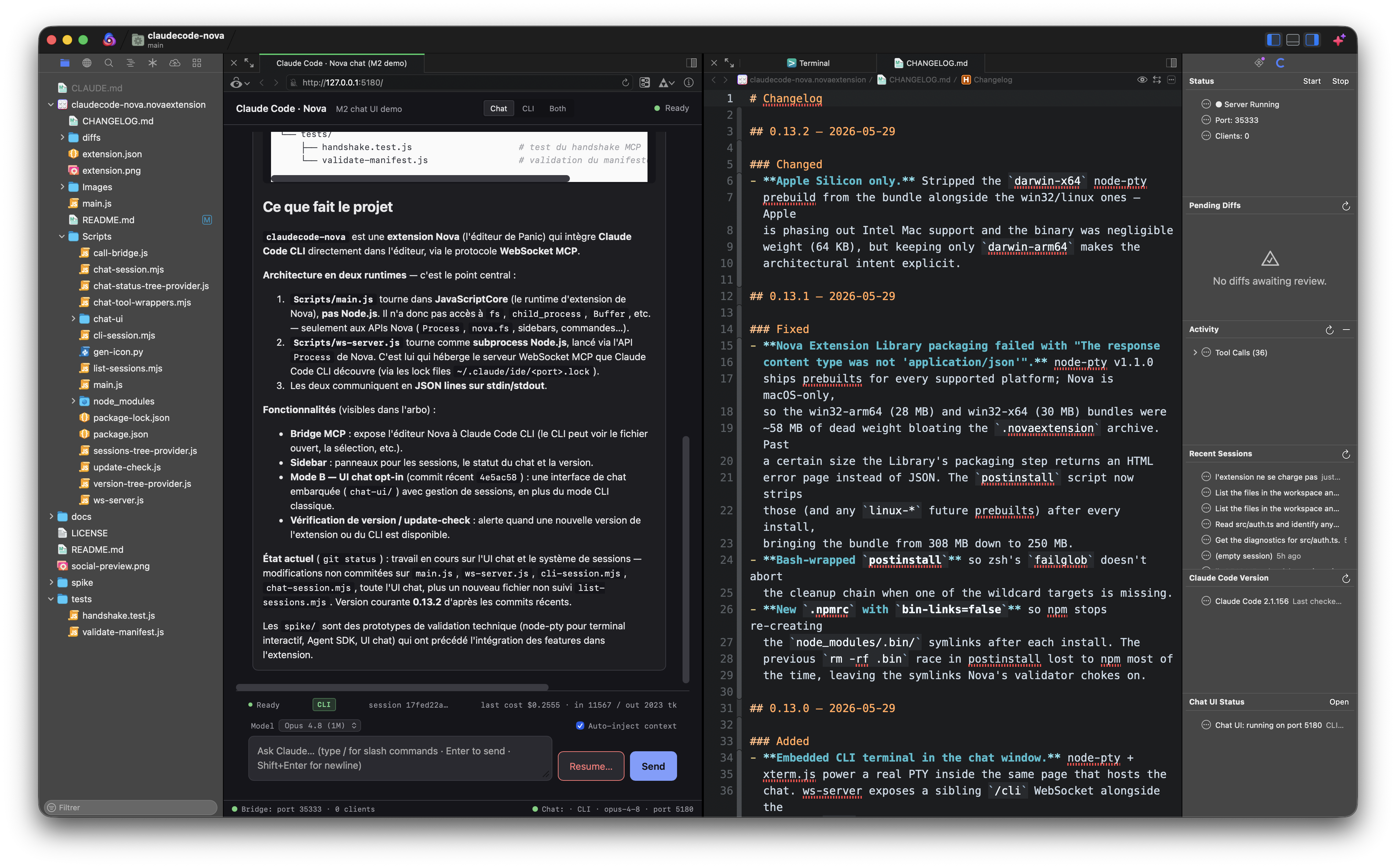
Why?
Claude Code has official IDE integrations for VS Code and JetBrains, but nothing for Nova. If you love Nova's native macOS experience and want Claude Code's full agentic capabilities — context sharing, inline diffs, selection tracking — this extension bridges the gap.
The approach was pioneered by coder/claudecode.nvim for Neovim. This project brings the same idea to Nova using its JavaScript extension API.
How It Works
The Nova extension (main.js) spawns a Node.js subprocess (ws-server.js) that runs a WebSocket server implementing the MCP (Model Context Protocol). Claude Code CLI discovers it through a lock file at ~/.claude/ide/<port>.lock — the same mechanism used by the official VS Code / JetBrains extensions. JSON-RPC 2.0 over WebSocket on localhost only, gated by a UUID token. The opt-in chat panel runs a second HTTP/WebSocket server (default 127.0.0.1:5180) that shares the same workspace context.
Features
- Automatic context sharing — Claude Code sees your active file, selection, and workspace structure
- Selection tracking — Real-time selection broadcasts as you navigate and select code
- Diff review — Accept or reject Claude's proposed changes; user edits in the proposed-changes tab are preserved on Accept and signalled back to Claude
- File operations — Claude can open files, save documents, and check for unsaved changes
- Six live sidebar sections — Connection status · pending-diffs queue with per-item Accept/Reject · activity log of file ops + diff outcomes · recent sessions for the workspace · Claude Code CLI version · Chat UI status (auto-refreshes every 30 s)
- One-click launch — Open Claude Code in iTerm or Terminal.app with the IDE-bridge env vars pre-set; the bridge connects automatically
- Opt-in embedded chat + terminal — In-window chat (Anthropic SDK or
claudeCLI subprocess backend) and a real PTY-backed terminal panel, both running on a single localhost HTTP server - 24 slash commands — Code-on-selection (
/explain,/refactor,/test,/doc,/fix,/review,/optimize,/simplify,/types,/security,/rename), git-driven (/commit,/changelog,/pr), workspace (/explain-error,/why,/search,/find), conversation (/plan,/recap,/clear), documentation (/spec,/readme,/api-doc) - Resume any session — Click an entry in the Recent Sessions sidebar (or the chat's "Resume…" menu) to replay + continue any prior conversation from
~/.claude/projects/<workspace>/*.jsonl - Secure by default — Localhost-only WebSocket with UUID token authentication; no data leaves the machine
Modes — Chat (web) and CLI panel (in-browser terminal)
In addition to the traditional Mode A (Claude Code CLI in an external terminal talking to Nova through the MCP bridge), v0.6+ ships an opt-in browser-based chat surface and v0.13+ embeds a real terminal inside the same window. Both run on a single localhost HTTP server (default http://127.0.0.1:5180/) spawned by the extension.
Chat (web)
A pure HTML/CSS/JS chat UI served by the bundled chat-session.mjs. Two backends are auto-selected:
- SDK mode — when an Anthropic API key is resolved (Keychain → 1Password → direct config in that order), the chat drives Claude via
@anthropic-ai/claude-agent-sdkin-process. You get streaming text, custom tool calls (24 Nova editor + workspace operations exposed as MCP tools), and the SDK's full event stream (thinking_delta,tool_use,tool_result, cost / usage). Billed against the API key. - CLI fallback — when no API key is configured, the chat spawns
claude -p ... --output-format stream-json --include-partial-messagesas a subprocess. Uses the user's existing Claude Code OAuth session (Pro / Max / Enterprise), so usage is covered by the subscription. Multi-turn via--resume <session_id>. The chat UI label badge saysCLIinstead ofSDKso you know which one is active.
What both modes have in common:
- 24 slash commands with a filterable menu (arrow keys, Enter/Tab, Esc to cancel) :
- Code on selection —
/explain,/refactor,/test,/doc,/fix,/review,/optimize,/simplify,/types,/security,/rename - Git-driven —
/commit(Conventional Commits draft from the current diff),/changelog(Keep-A-Changelog from commits since last tag),/pr(full PR template) - Workspace —
/explain-error(stack-trace triage),/why(intent behind selected code),/search(literal grep),/find(symbol-definition regex) - Conversation —
/plan(decompose a task into steps),/recap(summarize the session),/clear(frontend-only history wipe) - Documentation —
/spec,/readme,/api-doc - "Auto-inject context" toggle that prepends the current Nova selection + file path to every prompt
- Live model picker (Sonnet 4.6 / Haiku 4.5 / Opus 4.7 / Opus 4.8 1M) — switch mid-conversation, no restart
- Streaming
💭 Reasoning…collapsible block while Claude thinks before answering - "Resume…" button — lists per-workspace sessions from
~/.claude/projects/<encoded-cwd>/*.jsonl, click replays the full transcript and continues with--resume - Theme follows macOS / Nova appearance (
prefers-color-scheme) with a manual override setting (claudecode.chat.theme) if Nova's locked to a different mode
CLI panel (in-browser terminal)
An embedded terminal inside the chat page powered by xterm.js (client) + node-pty (server, real PTY via posix_spawnp). Spawns claude with the user-configured CLI command and args (claudecode.claudeCommand / claudecode.claudeArgs) and pipes input/output/resize over a WebSocket at /cli.
This isn't a polished terminal emulator — it's literally claude running with a PTY backend. You get:
- Raw mode + ANSI escape sequences + colors (Claude Code's TUI renders correctly)
- All the official
claudefeatures that depend on TTY detection (interactive prompts, vim-style keybindings,Esc+Entermultiline) - Same
~/.claude/projects/<encoded-cwd>/*.jsonlhistory Claude Code uses elsewhere — so a session you start here can be resumed from any other terminal and vice-versa - The full Claude Code skills / plugins / agents ecosystem (slash commands like
/architecture review, sub-agents, hooks) — because the runtime is the realclaudeCLI
Layout toggle
Three positions in the chat-page topbar:
- Chat — chat panel only
- CLI — terminal panel only
- Both — terminal on top, chat below, with a draggable horizontal splitter (re-fits the xterm grid live as you drag and tells the PTY about the new dimensions)
A single Anthropic conversation can span both panels in Both mode: ask Claude something in the chat, watch it use tools, then drop into the CLI to follow up — both surfaces share the same Claude Code session via --resume.
Where to open the chat window
Three buttons in the "Open Claude Chat" command's action panel:
- Open in Nova Preview — writes a small iframe wrapper file under the extension's global storage and opens it as a Nova editor tab;
Cmd+Shift+Hshows it in Nova's WebKit Preview, drag the tab to dock side-by-side with your code (closest approximation to VS Code's beside-panel webview that Nova's API allows) - Open in Browser — Safari / Firefox / your default
- Copy URL — drop into any browser tab manually
Requirements
| Dependency | Minimum Version |
|---|---|
| Nova | 10.0 |
| Node.js | 18.0 |
| Claude Code CLI | Latest |
Installation
From Source
git clone https://github.com/okapi-ca/claudecode-nova.git
cp -r claudecode-nova/claudecode-nova.novaextension \
  ~/Library/Application\ Support/Nova/Extensions/
For Development
git clone https://github.com/okapi-ca/claudecode-nova.git
ln -s "$(pwd)/claudecode-nova/claudecode-nova.novaextension" \
  ~/Library/Application\ Support/Nova/Extensions/claudecode-nova.novaextension
Then enable Extension Development in Nova: Preferences → General → Extension Development.
Quick Start
- Open a project in Nova
- The extension starts automatically (you'll see a notification)
- Run the Launch Claude Code command from Extensions → Claude Code Bridge (or the Command Palette).
- It opens Claude in your configured terminal (iTerm by default if installed, otherwise Terminal.app — see the
claudecode.terminalAppsetting) with the workspace cwd and IDE-bridge env vars already set. - The bridge connects automatically; no need to type
/ide. - You'll see a "Connected" notification in Nova. Claude now has access to your editor context.
Manual launch (alternative)
If you prefer to drive the terminal yourself, set claudecode.terminalApp to clipboard and run:
cd /your/project
CLAUDE_CODE_SSE_PORT=<port> ENABLE_IDE_INTEGRATION=true claude
The port is shown in the Show Claude Code Status command. Inside Claude, /ide triggers discovery if the env vars weren't picked up.
Supported MCP Tools
Two surfaces use tools:
- The MCP bridge (consumed by the
claudeCLI internally) — matches the protocol used by the official VS Code / JetBrains extensions. - The opt-in chat UI's SDK mode — exposes the same tools (where applicable) plus a handful of workspace + shell helpers as in-process MCP tools to the agent loop.
| Tool | Status | Bridge | Chat SDK | Description |
|---|---|---|---|---|
openFile |
✅ Full | ✓ | ✓ | Open a file with optional line navigation |
openDiff |
✅ Full | ✓ | ✓ | Diff via temp file + accept/reject notification. User edits in the proposed-changes tab are preserved on Accept and signalled back to Claude (see Known Limitations §1 for the side-by-side caveat). |
getCurrentSelection |
✅ Full | ✓ | ✓ | Current editor selection with file path and range |
getLatestSelection |
✅ Full | ✓ | ✓ | Most recently recorded selection |
getOpenEditors |
✅ Full | ✓ | ✓ | List all open editor tabs with metadata |
getWorkspaceFolders |
✅ Full | ✓ | ✓ | Workspace folder paths |
checkDocumentDirty |
✅ Full | ✓ | ✓ | Check for unsaved changes in a file |
saveDocument |
✅ Full | ✓ | ✓ | Save a document |
getDiagnostics |
⚠️ Partial | ✓ | ✓ | Requires LSP extension cooperation (see Limitations) |
closeAllDiffTabs |
⚠️ Best-effort | ✓ | ✓ | Removes our temporary proposed_* files; cannot close Nova editor tabs because Nova has no public tab-management API |
getGitDiff |
✅ Full | — | ✓ | git diff in the workspace (optional staged / range / stat, 64 KB cap). Drives /commit, /changelog, /pr. |
getGitLog |
✅ Full | — | ✓ | git log with range, limit, format (oneline / subject / full). Drives /changelog, /pr. |
workspaceSearch |
✅ Full | — | ✓ | Recursive grep (skips .git, node_modules, dist, …) with optional regex + glob. Drives /search, /find. |
applyEditAtSelection |
✅ Full | — | ✓ | Replace the active editor's current selection with new text — skips the diff review flow for self-contained rewrites (/refactor, /simplify, /rename). |
runShellCommand |
✅ Full | — | ✓ | Spawn /bin/sh -c <command> with stdout/stderr caps + timeout. Drives ad-hoc shell ops (build, test, git push, inspection). |
writeFile |
✅ Full | — | ✓ | Create or overwrite a file via nova.fs.open. Modes w / a / wx (safe-create). Optional createDirs for mkdir -p parent. Safer than heredoc-via-shell. |
fileExists |
✅ Full | — | ✓ | Stat a path and return {exists, isFile, isDirectory, isSymlink, size, mtime}. Returns {exists:false} cleanly when nothing's there. |
notify |
✅ Full | — | ✓ | Push a non-blocking Nova notification (info / warning / error). Useful for completion signals on long-running tasks. |
askUser |
✅ Full | — | ✓ | Block on a native Nova modal — action panel (2–4 button options) or input palette (free text). Returns {selectedIndex, selectedValue} / {text} / {cancelled}. |
listDirectory |
✅ Full | — | ✓ | nova.fs.listdir + stat. Optional recursive walk (skips .git, node_modules, …). Faster than runShellCommand('ls') for browsing. |
insertAtCursor |
✅ Full | — | ✓ | Insert text at the cursor without replacing the selection. Complement to applyEditAtSelection. |
replaceInFile |
✅ Full | — | ✓ | On-disk find/replace inside a specific file. Literal or regex, optional maxReplacements cap. |
clipboardWrite |
✅ Full | — | ✓ | Put text on the macOS clipboard via nova.clipboard.writeText. |
openNewTextDocument |
✅ Full | — | ✓ | Open an unsaved Nova document with optional content + syntax hint. Scratch-draft surface. |
getOpenDocuments |
✅ Full | — | ✓ | Lists every TextDocument Nova has open (including background tabs). Distinct from getOpenEditors. |
close_tab |
❌ Not supported | — | — | Nova exposes no public API to close an editor tab — see Known Limitations §6. Not advertised in tools/list. |
executeCode |
❌ Not supported | — | — | Nova has no Jupyter kernel integration. Not advertised in tools/list. |
Direct Tool Invocation (debug helper)
The Claude Code CLI only forwards mcp__ide__getDiagnostics to the model — the other 9 tools registered by ws-server.js are consumed internally by the CLI and not callable from a model conversation. For debugging or scripting, Scripts/call-bridge.js connects to the running bridge directly via the lock file and invokes any tool by name. No npm dependencies.
SCRIPT="$HOME/Library/Application Support/Nova/Extensions/ca.okapi.claudecode-nova/Scripts/call-bridge.js"
# (or wherever the extension is installed; for development use the project path)

node "$SCRIPT" --tools                         # list tools advertised by the bridge
node "$SCRIPT" getOpenEditors                  # call with empty args
node "$SCRIPT" getCurrentSelection
node "$SCRIPT" getWorkspaceFolders
node "$SCRIPT" openFile '{"filePath":"/abs/path","lineNumber":42}'
node "$SCRIPT" saveDocument '{"filePath":"/abs/path"}'
The script auto-discovers the lock file under ~/.claude/ide/, preferring one whose workspaceFolders matches the current cwd when several Nova instances are running. Output is the unwrapped tool result as pretty-printed JSON; errors go to stderr with a non-zero exit code.
Sidebar
The Claude Code sidebar exposes six sections:
- Status — connection state, port, client count. Header buttons start/stop the bridge.
- Pending Diffs — every diff Claude proposes is queued here with file name + age. Double-click Accept or Reject to resolve. Notifications still appear for the first diff (so it gets your attention); the sidebar handles multi-diff overflow. Double-click the parent item to see details with Open / Accept / Reject buttons.
- Activity — visible-effect events (file opens/saves, selections sent, diff outcomes). Click an item to open the corresponding file (file ops) or see a details dialog (diff ops). The collapsible Tool Calls group at the bottom shows the raw MCP traffic for debugging — including the bookkeeping calls Claude makes constantly (
getCurrentSelection,getOpenEditors, …). - Recent Sessions — per-workspace Claude Code sessions parsed from
~/.claude/projects/<encoded-cwd>/*.jsonl. Click an entry to choose where to resume: web chat (full transcript replay) · CLI panel · external Terminal · copyclaude --resume <id>to clipboard. - Claude Code Version — current CLI version + latest published on the configured channel (stable / next). Auto-checks daily (throttled).
- Chat UI Status — lifecycle state of the chat server (
disabled/no_key/starting/running/failed/stopped) including port, model, and key source. Header button opens the chat in your browser or Nova's Preview tab.
Buffers are bounded (50 activity events, 100 tool calls). Header Refresh re-renders, Clear empties both buffers. Auto-refresh every 30 s keeps relative timestamps accurate.
Commands
Access these from Extensions → Claude Code Bridge or the Command Palette:
| Command | Description |
|---|---|
| Start Claude Code Bridge | Start the WebSocket MCP server |
| Stop Claude Code Bridge | Stop the server and disconnect clients |
| Restart Claude Code Bridge | Stop + restart (useful after settings changes) |
| Send Selection to Claude | Push the current selection as context (also ⌃⌘L) |
| Add Current File to Claude | Send the entire active file as context (also ⌃⌘A) |
| Show Claude Code Status | Display connection status and server info |
| Launch Claude Code (with IDE integration) | Open Claude Code in your terminal of choice (iTerm or Terminal) with the IDE bridge env vars pre-set. Falls back to clipboard for unsupported terminals — see claudecode.terminalApp setting. |
| Open Claude Chat in Browser | Open the chat UI URL in your default browser (or use the action panel to pick Nova Preview / copy URL) |
| Set Claude Chat API Key (Keychain) | Store an Anthropic API key in macOS Keychain — survives reinstalls and isn't readable from Nova settings |
| Clear Claude Chat API Key (Keychain) | Remove the stored key |
| Check for Claude Code Updates | Force a check of the configured npm dist-tag (stable / next) |
Configuration
Global Preferences
| Key | Default | Description |
|---|---|---|
claudecode.portMin |
10000 |
Minimum port for the bridge WebSocket server |
claudecode.portMax |
65535 |
Maximum port |
claudecode.autoStart |
true |
Start the bridge automatically on activation |
claudecode.trackSelection |
true |
Broadcast selection changes in real time |
claudecode.nodePath |
node |
Path to the Node.js executable used by the server helper |
claudecode.diffTimeoutMinutes |
30 |
Auto-reject pending diffs after N minutes so Claude isn't stuck waiting on a dead requestId. Set to 0 to disable. |
claudecode.terminalApp |
auto |
Where Launch Claude Code opens the CLI: auto, iTerm, Terminal, or clipboard. Other terminals (Warp, Ghostty, Hyper) fall back to clipboard automatically. |
claudecode.updateCheck.autoCheck |
true |
Daily background check of npm for new Claude Code CLI versions |
claudecode.updateCheck.channel |
stable |
stable (npm latest) or next (npm @next pre-releases) |
claudecode.chat.enabled |
false |
Opt-in to the embedded chat UI (Mode B). When enabled, the chat HTTP server starts on claudecode.chat.port. |
claudecode.chat.port |
5180 |
Fixed port for the chat HTTP server (so Nova's Preview URL stays stable) |
claudecode.chat.model |
claude-sonnet-4-6 |
Default chat model — Sonnet 4.6 / Haiku 4.5 / Opus 4.7 / Opus 4.8 (1M ctx). Switchable mid-conversation in the UI. |
claudecode.chat.theme |
auto |
auto follows prefers-color-scheme. Set to dark or light if Nova is locked to a theme that doesn't match macOS. |
claudecode.chat.keychainService |
ca.okapi.claudecode-nova |
macOS Keychain service identifier for the API key. Point to another service (e.g. com.anthropic.claudefordesktop) to reuse an existing entry. |
claudecode.chat.keychainAccount |
anthropic-api-key |
Account name within the Keychain service above |
claudecode.chat.apiKey1PassRef |
(empty) | 1Password CLI reference like op://Private/Anthropic API Key/credential. Requires an active op signin session. |
claudecode.chat.apiKey |
(empty) | Plain-text API key — last-resort fallback when both Keychain and 1Password are empty. Prefer the Keychain. |
Per-Project Settings
| Key | Default | Description |
|---|---|---|
claudecode.claudeCommand |
claude |
Command to launch Claude Code CLI |
claudecode.claudeArgs |
(empty) | Extra args appended to the Claude command on launch (e.g. --continue, --model claude-opus-4-7, --dangerously-skip-permissions) |
Known Limitations
The following limitations exist due to Nova's extension API boundaries:
-
Diff viewer — Nova does not expose a native diff API like VS Code's
vscode.diff. Proposed changes are shown by opening a temporary file alongside the original, with an accept/reject notification. Edits the user makes in the proposed-changes tab before clicking Accept are preserved (the actual content of the temp file is what gets saved) and signalled back to Claude viauserEdited: truein the response. A future version may leverage Nova's built-in Git comparison view for side-by-side rendering. -
Diagnostics — Nova does not provide a global API for reading LSP diagnostics from third-party extensions. The
getDiagnosticstool currently returns an empty list. Full support would require cooperation with language server extensions or a sharedIssueCollection. -
No native WebSocket server — Nova's JavaScript runtime does not include
WebSocketserver or raw TCP socket APIs. The workaround is a Node.js subprocess, which adds a dependency but works reliably. -
No HTTP preview integration — Nova's built-in web preview is not accessible through the extension API, so Claude cannot interact with the preview pane.
-
Selection line numbers — Nova's
Rangeis character-offset based. Line number mapping in selection tracking is approximate. A future version will useTextDocumentline-counting methods for precise ranges. -
No tab-management API — Nova exposes no method on
TextEditororWorkspaceto close an editor tab from an extension. As a consequence: close_tab(tool 11 in claudecode.nvim PROTOCOL.md) is not advertised in ourtools/list— Claude will not call it.closeAllDiffTabsonly removes the temporaryproposed_*files staged in extension storage; the corresponding tabs in Nova remain open until the user closes them manually (Cmd+W).-
Confirmed by the Tabs Sidebar extension, which documents the same limitation.
-
No Jupyter kernel integration —
executeCode(tool 12 in PROTOCOL.md) is unsupported. Nova does not expose a notebook runtime, and exposing one would be a separate product. Not advertised intools/list.
Architecture
claudecode-nova.novaextension/
├── extension.json              # Manifest (commands, sidebar, config)
├── main.js                     # (kept in sync with Scripts/main.js — Nova loader quirk)
├── Scripts/
│   ├── main.js                 # Extension entry point — Nova APIs ↔ subprocesses
│   ├── ws-server.js            # MCP bridge (WebSocket server, Node subprocess)
│   ├── chat-session.mjs        # Chat backend (/ws) — SDK + CLI subprocess modes
│   ├── cli-session.mjs         # CLI panel backend (/cli) — node-pty PTY bridge
│   ├── chat-tool-wrappers.mjs  # In-process MCP tools exposed to the chat SDK
│   ├── list-sessions.mjs       # Parses ~/.claude/projects/<cwd>/*.jsonl
│   ├── sessions-tree-provider.js
│   ├── chat-status-tree-provider.js
│   ├── version-tree-provider.js
│   ├── update-check.js         # npm dist-tag polling for Claude Code CLI
│   ├── call-bridge.js          # Standalone CLI client for invoking bridge tools
│   └── chat-ui/                # HTML / CSS / JS chat client (served by chat-session.mjs)
├── Images/                     # Sidebar + extension icons
├── CHANGELOG.md
└── README.md
Communication Flow
- Nova extension (
main.js) spawnsws-server.jsas a child process ws-server.jsbinds a WebSocket server on127.0.0.1:<random_port>- A lock file is written to
~/.claude/ide/<port>.lockwith connection info - Claude Code CLI discovers the lock file via
/idecommand - CLI connects to the WebSocket, authenticates with the UUID token
- MCP tool calls arrive as JSON-RPC 2.0 requests over WebSocket
ws-server.jsforwards them tomain.jsvia stdout JSON linesmain.jsexecutes the tool using Nova APIs and sends the result back via stdinws-server.jswraps the result in MCP format and returns it over WebSocket
Lock File Format
{
  "port": 12345,
  "authToken": "a1b2c3d4-e5f6-4a7b-8c9d-0e1f2a3b4c5d",
  "version": "0.2.0",
  "ideName": "Nova",
  "ideVersion": "1.0.0",
  "workspaceFolders": ["/Users/you/project"],
  "pid": 54321
}
Security
- WebSocket server binds to
127.0.0.1only (no network exposure) - Every connection requires the UUID auth token in the
x-claude-code-ide-authorizationheader - Lock files are removed on clean shutdown
- No data leaves your machine — all communication is local IPC
Release notes
For the full version history, see CHANGELOG.md.
Future ideas
- Multimodal: drag-drop images into the chat for vision-aware questions (SDK mode only)
- Extended thinking mode toggle (
thinking.budget_tokens) - Specialized sub-agents invocable from chat (reviewer, test-writer, security-checker)
- Auto-purge of zombie chat server on the chat port at bridge startup
- Side-by-side diff view (currently single-file proposed changes — pending Nova API support)
- Inline hints / ephemeral annotations via Nova's
IssueCollection
Contributing
Contributions are welcome! This project exists because the community (notably coder/claudecode.nvim) proved that third-party IDE integrations with Claude Code are fully achievable.
- Fork the repository
- Create a feature branch (
git checkout -b feature/amazing-thing) - Commit your changes (
git commit -m 'Add amazing thing') - Push to the branch (
git push origin feature/amazing-thing) - Open a Pull Request
Development Tips
- Enable Nova's Extension Console: Extensions → Show Extension Console, filter by source
- The
ws-server.jssubprocess logs are piped through — check the console for both layers - Use
claude --idefrom an external terminal to test connections - The PROTOCOL.md from claudecode.nvim is the definitive protocol reference
Credits
- Author: Marc Bourget — CISSP, Principal Director of Cybersecurity
- Sponsor: LCI Education — An international educational community of 12 higher education institutions across 17 campuses on 5 continents. LCI Education supports open-source initiatives and encouraged the public release of this project.
- Protocol reverse engineering: coder/claudecode.nvim by Thomas Kosiewski and contributors
- Nova Extension API: docs.nova.app
- Claude Code: Anthropic
Sponsor
LCI Education
Proudly supporting open-source development
LCI Education is an international educational community comprising 12 higher education institutions
operating across 17 campuses on 5 continents, dedicated to accessible, quality education worldwide.
License
MIT — See LICENSE for details.
Release Notes
Changelog
0.22.6 — 2026-05-31
Changed
- The CLI panel's Restart button now clears the terminal (screen +
scrollback) before relaunching claude, so the new session starts on a
clean screen instead of stacking under the previous output.
0.22.5 — 2026-05-31
Added
- "Live" button in the CLI panel — the terminal header now has its
own ⇄ Live button (beside Resume/Restart) that lists running local
claude sessions and attaches the picked one in the terminal. The
chat's Live button resumes in the chat; the CLI panel's attaches in
the terminal.
Fixed
- Stale chat-ui assets — the chat HTTP server now serves with
no-storeso WebKit (Nova Preview) always fetches fresh JS/CSS after
an update, instead of holding a cached ES module.
0.22.4 — 2026-05-31
Fixed
- "Live" sessions now resume in the chat — picking a running local
session from the ⇄ Live menu opened it in the terminal (CLI panel); it
now replays the transcript and continues in the chat window (switching
to the chat layout if needed), like the Resume button. - Chat results horizontal overflow — wide content (code blocks, long
URLs, tables) no longer forces the message area wider than its
container; messages getmin-width:0and code blocks scroll inside
the bubble (fixes layout glitches on window resize).
0.22.3 — 2026-05-31
Fixed
- Window-resize glitches — the terminal was re-fit on every resize
event, including while its panel was hidden (a zero-size panel
corrupts xterm's grid), and without debouncing it thrashed during
continuous window drags. The resize handler is now debounced (120ms),
only fits the terminal when its panel is visible, and keeps the chat
pinned to the bottom across the reflow.
0.22.2 — 2026-05-31
Fixed
- Zombie chat port (5180) — when a stale chat server from a previous
Nova session was still holding the port at relaunch, the chat server
gave up binding and stayed dead until a manual "Restart Bridge". It now
retries the bind up to 8× over ~6s onEADDRINUSE, auto-recovering
once the old process exits.
0.22.1 — 2026-05-31
Polish — floating panels
- The chat results area and the composer are now floating panels
(rounded, bordered, inset) inside the chat card, mirroring the way the
Claude TUI box floats inside the terminal card. The parent card's fill
matches the page background so only a thin frame shows around the
floating panels. - The composer is aligned with the results panel (same side/bottom
insets, border, radius) and stays on the light surface. - Equal light top/bottom breathing room inside the terminal and the chat
message area; a matching gap below the Claude TUI box so it isn't
pinned to the card's bottom edge.
0.22.0 — 2026-05-31
Added — chat UX
- Edit & resend — ArrowUp on an empty composer recalls your last
prompt to edit and resend. - Context gauge — a round (donut) ring shows how full the context
window is (last turn's input_tokens vs the model's max: 1M for the
Opus 4.8 "1M" variant, else 200k). Tints amber ≥60%, red ≥85%; the
exact figures are in the tooltip. Click the ring to compact the
conversation. - Keyboard shortcuts —
Cmd/Ctrl+Kfocuses the composer;Esc
aborts the in-flight query. - Tokens in clear — the cost line shows the last turn's in/out
tokens and the cumulative session total, not just a tooltip. - Clickable session id — click it to copy the full id (shown in the
tooltip).
Changed — composer & visual design
- Floating-card look — the chat and CLI panels now sit as rounded,
bordered, shadowed cards on a darker "desk" background, so each stands
out (chat lighter, terminal darker). Assistant bubbles bumped to read
as raised on the card. - Composer reorganised: model picker + auth badge on the left; a
centered bottom line below the input carries session (left) · cost +
tokens (center) · context ring + Auto-inject toggle (right). - Slimmer single-row input + smaller Send/Stop; lighter, harmonised
buttons across chat and CLI panels. - Removed the message area's top/bottom padding and a phantom empty bar
under the composer.
0.21.1 — 2026-05-31
Changed — "Remote" button is now "Live sessions"
The v0.21.0 Remote button was confusing: it reused Resume's past-session
list, and there's no way for the local CLI to enumerate or attach to
remote sessions running in the cloud / on a server (claude
remote-control is host-only; that registry lives on Anthropic's relay,
reachable only from claude.ai/code + the mobile app).
The meta-bar button is now "⇄ Live": it lists the claude sessions
currently running on this machine (claude agents --json — dir, status,
pid, age) and jumps into the picked one in the CLI panel via
claude --resume <id>. Clear split from Resume (past conversations) vs
Live (currently-running sessions).
0.21.0 — 2026-05-31
CLI panel — never get stranded
- Restart button ("↻ Restart") in the terminal header spawns a
freshclaudePTY without reloading the page. Quittingclaudeused
to leave a dead terminal with no way back (the "switch layout to
reconnect" hint didn't actually work); now it does, and the button
makes it obvious. - Resume button ("⏱ Resume") in the terminal header lists the
workspace's past sessions and relaunches the terminal with
claude --resume <id>. - Remote Control button ("⇄ Remote") in the composer meta bar lists
past sessions and launches the picked one in the CLI panel with
--remote-control, so it can be driven from claude.ai/code or the
Claude mobile app.
Chat UX
- Respectful auto-scroll — streaming no longer yanks you to the
bottom while you're reading scrolled-up history. A floating
"↓ Latest" button appears instead and re-pins on click. Sending a
message always jumps down. - UI state persists across reloads — layout (Chat/CLI/Both), model
picker, auto-inject toggle, and the Both-mode splitter ratio are
saved to localStorage. - Export to Markdown — "⤓ Export" button saves the conversation
(messages + tool-call notes) as a timestamped.mdfile.
Polish
- Connection-type indicator now reads "OAuth" instead of "CLI" when
running on the Claude Pro/Max session (clearer, and no longer clashes
with the terminal "CLI panel" naming). - Resume moved out of the input row into the meta bar; Export / Remote /
Resume grouped at the right with Auto-inject context far right. - Composer slimmed down (single-row input, smaller Send/Stop), CLI
header buttons restyled to match the chat's button language. - Fixed phantom empty space below the composer (the hidden image-
attachment bar was rendering because adisplay:flexrule overrode
thehiddenattribute).
0.20.0 — 2026-05-31
Fixed — chat (CLI mode) could not modify files
When the chat runs in CLI fallback mode (no Anthropic API key — using
your Claude Pro/Max session), it spawns claude -p … --output-format
stream-json. In non-interactive -p mode, Claude Code's default
permission mode is effectively read-only: file-edit prompts can't be
answered, so Write / Edit were silently denied. The chat could read
files and answer questions but never modify anything — the model
would describe a change that never landed.
The CLI driver now passes --permission-mode (new setting
claudecode.chat.cliPermissionMode, default acceptEdits), so the
chat can actually create and edit files. Options:
acceptEdits(default) — auto-approves file create/modify, but not
arbitrary shell commands.bypassPermissions— also allows shell commands (most powerful,
least safe; equivalent to--dangerously-skip-permissions).default— preserves the previous read-only behaviour for users
who want the chat to stay consultative.
SDK mode (with an API key) was not affected — it pre-approves the
Nova MCP tools via allowedTools, so file modifications already worked
there. This fix is specific to the no-API-key CLI path.
0.19.1 — 2026-05-30
Fixed — two v0.19.0 audit follow-ups
- Message spacing doubled — the per-message Copy-on-hover added a
16 pxmargin-bottomon top of the chat container's existing 12 px
gap, producing 28 px between messages (too loose). Removed the
margin; action buttons now sit absolutely in the existing gap with
bottom: -16 px, and the chat container's 20 px bottom padding
catches the last message's overflow so it isn't clipped. DAILY_KEYfrozen at module load — the cost-tracking daily
bucket key was computed once when chat.js was parsed. A chat window
left open past midnight kept incrementing yesterday's bucket
instead of starting the new day. Now resolved fresh on every read /
write viadailyKey().
0.19.0 — 2026-05-30
UI overhaul — chat styling, cost tracking, multimodal, sidebar
Chat styling polish
- Every fenced code block now shows its detected syntax (uppercase
label, top-left of the <pre>) — TYPESCRIPT, SQL, JSON, etc.
Extracted from highlight.js's auto-detected class.
- Every message bubble now has a hover-revealed action row in the
lower-right with a Copy button. Reads the body text fresh so
streaming assistant messages copy the current state. Works on user,
assistant, and replayed history messages.
Cost / token tracking cumulatif
- The composer meta bar now shows last $X.XXXX · session $Y.YYYY ·
today $Z.ZZZZ (previously: only last cost).
- Daily total persists to localStorage keyed by ISO date —
survives page reloads, resets at midnight local time.
- Session total resets when the backend starts a fresh session
(different ID) or when the user runs /clear.
- Detailed token breakdown (last / session / today, input / output)
is in the meta bar's tooltip so the visible text stays compact.
Multimodal — drag-drop + paste images (SDK mode only)
- Drop zone overlay shown on dragenter anywhere on the page. Drop
one or more PNG / JPEG / GIF / WebP files into the composer to
attach them to the next message.
- Cmd+V paste into the input also captures clipboard images (e.g.
a screenshot from Shift+Cmd+Ctrl+4).
- Thumbnails appear above the input with a remove button (×) per
image. Too-large images (> 5 MB Anthropic limit) are flagged and
skipped on send.
- Backend serialises attachments into the SDK's image content
blocks (type: "image", source: { type: "base64", media_type,
data }) and combines with the text prompt.
- CLI mode rejects attachments with a clear error message — claude
-p doesn't accept inline images.
Sidebar UX polish
- Pending Diffs row now shows diff stats inline in the descriptive
text (+12 -3 · 5s ago) so the user can triage a 1-line tweak vs.
a 80-line rewrite at-a-glance without hovering.
- Recent Sessions row now shows the captured git branch inline next
to the relative time (feature/auth-rewrite · 2h ago) —
disambiguates sessions across feature branches.
- Recent Sessions tooltip wording updated to reflect the v0.7+ multi-
destination resume flow (chat / CLI panel / terminal / clipboard).
0.18.0 — 2026-05-30
Added — six more Nova-native MCP tools (SDK catalog now 24)
This release closes the remaining gaps in the Nova-tool catalog
identified during the v0.16/v0.17 audit. The chat now has direct,
typed access to filesystem traversal, fine-grained editor edits,
on-disk find/replace, clipboard, and document lifecycle.
listDirectory uses nova.fs.listdir + stat to return
[{name, isFile, isDirectory, isSymlink, size}] for a given path.
Optional recursive: true walks subdirs (skips .git, node_modules,
dist, build, .next, .venv, __pycache__). Capped at
maxEntries (default 500) — sets truncated: true if hit.
insertAtCursor inserts text at the active editor's cursor
without replacing the selection. Distinct from applyEditAtSelection
(which replaces). If a selection exists, text is inserted at the
selection start; selection is preserved.
replaceInFile runs a find/replace pass directly on disk via
nova.fs.open(r/w) — no editor involvement. Literal substitution by
default; regex: true with optional flags for pattern matching
(forces g flag if missing). maxReplacements caps substitution
count. Useful when applyEditAtSelection is too narrow but a full
diff review would be overkill.
clipboardWrite puts text on the macOS clipboard via
nova.clipboard.writeText. Asymmetric with the existing readText
side — the chat now both reads context from the clipboard and writes
generated snippets back.
openNewTextDocument creates an unsaved Nova document with
optional initial content + syntax hint (e.g. markdown,
typescript). Useful for scratch drafts before deciding the save
target with writeFile.
getOpenDocuments returns every TextDocument Nova has open
(including background tabs without an active editor). Different from
getOpenEditors, which is editor-instance-scoped. Each entry exposes
{path, uri, isDirty, isUntitled, isClosed, syntax, length, eol}.
All six are wrapped in chat-tool-wrappers.mjs with Zod schemas and
exposed as mcp__nova__listDirectory, mcp__nova__insertAtCursor,
mcp__nova__replaceInFile, mcp__nova__clipboardWrite,
mcp__nova__openNewTextDocument, mcp__nova__getOpenDocuments.
The SDK's tool catalog goes from 18 (v0.17.0) to 24.
0.17.0 — 2026-05-30
Added — four more Nova-native MCP tools for the chat SDK
These close the most painful gaps where Claude was bidouilling around
missing primitives — writeFile via runShellCommand heredocs,
asking questions in-chat instead of using Nova's native modal, etc.
writeFile creates or overwrites a file using nova.fs.open.
Modes: w (default, truncate + write), a (append), wx
(safe-create — fails if the file exists). Optional createDirs
flag walks the parent path and mkdirs missing segments. Returns
{ ok, path, bytes, mode }. Safer than the runShellCommand +
heredoc workaround (no shell escaping pitfalls, no PTY quirks).
fileExists stats a path with nova.fs.stat and returns
{ exists, isFile, isDirectory, isSymlink, size, mtime }. Returns
{ exists: false } cleanly — not an error — when nothing matches.
Use before destructive writes to confirm intent.
notify pushes a non-blocking Nova notification via
NotificationRequest. Optional type (info / warning / error)
controls a title-prefix icon. Returns { ok, id }. Useful for "build
done" / "tests passed" signals when the chat is in the background.
askUser blocks until the user answers via a native Nova modal.
Two flavors auto-selected from the args:
- With options: [...] → showActionPanel (2–4 button choice),
returns { selectedIndex, selectedValue }
- Without options → showInputPalette (free text with optional
placeholder + defaultValue), returns { text }
- User dismissal returns { cancelled: true }
Both are exposed to the chat SDK as mcp__nova__writeFile,
mcp__nova__fileExists, mcp__nova__notify, and
mcp__nova__askUser. The chat now has 18 in-process Nova tools
(was 14 in v0.16.0).
0.16.1 — 2026-05-30
Docs — README overhauled (root + bundle)
The root and bundle READMEs had drifted significantly behind reality.
Both have been brought up to v0.16.0:
- Tools table now lists all 14 tools across two columns (Bridge /
Chat SDK) — adds the 5 SDK-only tools (getGitDiff,getGitLog,
workspaceSearch,applyEditAtSelection,runShellCommand) - Slash commands updated from the original 5 to the current 24,
organized by category (code-on-selection / git-driven / workspace /
conversation / documentation) - Sidebar now correctly describes the 6 live sections (was 3) —
adds Recent Sessions, Claude Code Version, Chat UI Status - Commands table completes the 11-entry list — adds Restart, Open
Chat in Browser, Set/Clear Chat API Key, Check for Updates - Configuration tables exhaustively cover all 17 global keys +
2 per-project keys (was 6 + 1) - Architecture file tree matches actual
Scripts/contents - Release notes redirect to
CHANGELOG.md(single source of
truth, no more drift) - Future ideas drops items already shipped (apply-edit-at-
selection, spawn-terminal-command) and surfaces what's actually
next - Removed the large "How It Works" ASCII box diagram — the
paragraph that followed says the same thing in less screen space
0.16.0 — 2026-05-30
Added — two new Nova MCP tools for the chat SDK
applyEditAtSelection lets the chat write directly into the active
Nova editor at the current selection — skipping the diff review flow
for self-contained rewrites like /refactor, /simplify, /rename.
Trailing newline is stripped by default (override with
trimTrailingNewline: false). Returns the new range + byte counts so
the model can confirm what it actually changed.
runShellCommand spawns /bin/sh -c <command> in the workspace
(or an explicit cwd), captures stdout + stderr with per-stream byte
caps (default 64 KB), and SIGTERMs the process after timeoutMs
(default 30 s). Intentionally permissive — no safe-list — so the chat
can drive npm test, git checkout, git commit, ad-hoc inspection
commands, etc. Returns {code, stdout, stderr, timedOut, truncated,
durationMs}.
Both tools are exposed to the chat SDK as mcp__nova__applyEditAtSelection
and mcp__nova__runShellCommand with full Zod input schemas. They cover
most of the gap where Claude previously had to fall back to clipboard
copy-paste or the diff review flow for trivial edits.
0.15.0 — 2026-05-30
Added — slash command catalog more than quadrupled
19 new slash commands across 6 categories. The chat composer's
/ menu now offers 24 ready-made prompts that follow conventions
the team already uses (Conventional Commits, Keep-A-Changelog,
OWASP).
Code on selection (Phase 1 — 6 new) :
- /review — style + bugs + security, ranked by severity
- /optimize — perf / memory improvements with before / after
- /simplify — extract / flatten / dead-code removal
- /types — idiomatic type annotations without behavior change
- /security — focused OWASP-style review with CWE references
- /rename — clearer identifier names with rationale
Git-driven (Phase 2-3 — 3 new) :
- /commit — drafts a Conventional Commit from the current
diff. Backed by a new getGitDiff Nova MCP tool
(Process-spawned git diff with optional staged
/ range / stat, 64 KB cap).
- /changelog — detects the last release tag, reads commits since,
groups under Keep-A-Changelog headings. Uses the
new getGitLog tool.
- /pr — reads main..HEAD log + diff stat, produces the
full PR template (Summary / What changed / Test
plan).
Workspace (Phase 4 — 4 new) :
- /explain-error — diagnoses a stack trace: What broke / Where /
Why / Fix.
- /why — explains intent behind selected code, not
what it does (problem solved, alternatives
rejected, invariants maintained).
- /search — literal grep across the workspace, grouped by
file. Backed by a new workspaceSearch tool
(/usr/bin/grep -rIn with the usual exclude-
dirs and a 200-hit cap).
- /find — locates a symbol definition: builds a
language-aware definition regex and calls
workspaceSearch.
Conversation (Phase 5 — 3 new) :
- /plan — break the request into an ordered checklist and stop;
wait for OK before executing.
- /recap — five-bullet summary of the current conversation.
- /clear — frontend-only wipe of the chat + reset_session so
the next user_message starts a brand-new conversation.
Documentation (Phase 6 — 3 new) :
- /spec — turns the conversation into a markdown spec.
- /readme — calls getWorkspaceFolders, sniffs project layout,
produces a full README.
- /api-doc — extracts the public API surface of the selected code
(signature / summary / params / returns / throws /
example per export).
Added — new Nova MCP tools backing the commands
getGitDiff—git diffwith optionalstaged/range/
stat/maxBytes. Returns the raw diff +
truncation flag.getGitLog—git logwithrange/limit/format
(oneline/subject/full) /maxBytes.workspaceSearch—grep -rInwithquery/regex/glob/
maxHits/maxBytes, parsed into
{file, line, text}records.
All three are also surfaced to the chat SDK via
chat-tool-wrappers.mjs. In CLI mode Claude reaches the same data
through its native Bash tool.
0.14.2 — 2026-05-30
Documentation
- Expanded catalog description. The Panic Library listing was
still running the v0.2-era one-liner that only mentioned the MCP
bridge. The newextension.json:descriptioncovers all three
pillars (MCP bridge, chat panel, embedded terminal), the
SDK-or-Pro/Max-subscription auth twist, and session resume in
four short sentences so first-time browsers see the actual
surface area of the extension at a glance.
0.14.1 — 2026-05-29
Fixed
- Screenshot was broken on Panic Extension Library. The
renderer doesn't resolve relative image paths inside the
.novaextensionbundle reliably, so the v0.14.0 README showed
a broken-image icon. Switched the bundle README to an absolute
https://raw.githubusercontent.com/...URL that loads at render
time, and removed the now-unused 2.8 MB copy from
Images/screenshot.png.docs/screenshot.pngat the repo root
is kept for the GitHub README.
0.14.0 — 2026-05-29
Added
- Resume any past session from the Nova sidebar. Clicking a row
in the "Recent Sessions" panel now opens an action panel with
four destinations: - Chat (web) — broadcasts a
resume_externalevent to every
open chat WS client; the chat UI replays the transcript and
continues with--resume <session_id>on the next message. - CLI panel — tells the embedded terminal client to close
its WebSocket and reconnect to/cli?session=<id>, which makes
cli-session.mjsprepend--resume <id>to the spawn args. - Terminal — launches iTerm / Terminal.app via osascript
withclaude --resume <id>already typed in. - Copy command — the original v0.7.0 behaviour, preserved.
- In-chat "Resume…" button next to Send. Opens a menu listing
the workspace's~/.claude/projects/<encoded-cwd>/*.jsonl
sessions (top 30, mtime desc) with preview, full UUID, relative
time, and git branch. - Full transcript replay when a session is resumed. A new
list-sessions.mjsmodule streams the entire .jsonl back to the
chat UI ashistory_message/history_tool_use/
history_tool_resultevents. Replayed bubbles and tool cards
render with.msg--history/.tool--historydimmed styling so
the user can tell the existing turns from the live ones; markers
↻ Loading session …/— end of replay · continue below —
frame the replay. - Pending-delivery stash. If the user clicks the sidebar action
before any chat / CLI client is alive, both session modules
remember the sessionId and replay it to the first new client
that connects. Cleared once delivered (single-shot). - Composer status mirror. A second dot + text indicator in the
composer meta bar mirrors the topbar status (Ready/Thinking…
/Using <tool>…/Writing response…) so the user sees
Claude's activity next to the input field, not just up in the
topbar.
Documentation
- README screenshot illustrating the chat + embedded terminal
integration (docs/screenshot.pngfor GitHub,
Images/screenshot.pngfor the Panic Library bundle). - New "Modes — Chat (web) and CLI panel" section in both
READMEs covering everything that landed since v0.6: SDK vs CLI
fallback auto-detection, slash commands, auto-context toggle,
live model picker, streaming Reasoning block, "Resume…" session
picker with history replay, the three-way Chat/CLI/Both layout
toggle with draggable splitter, and the three places the chat
window can be opened.
Backend wire format
New WS message types added to chat-session.mjs and ws-server.js:
list_sessions, sessions, resume_session, session_resumed,
resume_external, history_begin, history_message,
history_tool_use, history_tool_result, history_end. ws-server
also receives resume_in_chat / resume_in_cli over its stdin
channel from main.js and forwards them to the relevant session
module's pushResumeRequest().
0.13.2 — 2026-05-29
Changed
- Apple Silicon only. Stripped the
darwin-x64node-pty
prebuild from the bundle alongside the win32/linux ones — Apple
is phasing out Intel Mac support and the binary was negligible
weight (64 KB), but keeping onlydarwin-arm64makes the
architectural intent explicit.
0.13.1 — 2026-05-29
Fixed
- Nova Extension Library packaging failed with "The response
content type was not 'application/json'". node-pty v1.1.0
ships prebuilts for every supported platform; Nova is macOS-only,
so the win32-arm64 (28 MB) and win32-x64 (30 MB) bundles were
~58 MB of dead weight bloating the.novaextensionarchive. Past
a certain size the Library's packaging step returns an HTML
error page instead of JSON. Thepostinstallscript now strips
those (and anylinux-*future prebuilts) after every install,
bringing the bundle from 308 MB down to 250 MB. - Bash-wrapped
postinstallso zsh'sfailglobdoesn't abort
the cleanup chain when one of the wildcard targets is missing. - New
.npmrcwithbin-links=falseso npm stops re-creating
thenode_modules/.bin/symlinks after each install. The
previousrm -rf .binrace in postinstall lost to npm most of
the time, leaving the symlinks Nova's validator chokes on.
0.13.0 — 2026-05-29
Added
- Embedded CLI terminal in the chat window. node-pty +
xterm.js power a real PTY inside the same page that hosts the
chat. ws-server exposes a sibling/cliWebSocket alongside the
existing/wsand pipes input/output/resize/exit messages
between the browser terminal and aclaudesubprocess. - Three-way layout toggle in the topbar: Chat / CLI /
Both. In Both mode, the terminal sits on top of the chat
(CSSorderswap) with a draggable horizontal splitter that
re-fits xterm and pings the PTY with the new dims as the user
drags. - Persistent bottom statusbar with two live readouts:
- Bridge:
port N · K clients(green dot when the MCP
server is listening, count updates as Claude CLI instances
connect/disconnect on the bridge port). - Chat:
MODE · model · port(reflects the model picker and
the SDK/CLI mode in real time). claudecode.chat.themesetting (auto/dark/light).
Nova doesn't expose its active theme to extensions, so users
whose Nova is locked to one theme while macOS uses the other
can force-match. All previous@media (prefers-color-scheme: light)blocks were rewritten as
:root[data-theme="light"]scoped selectors so the JS override
works on every rule, not just the OS-driven branch. The xterm.js
terminal also follows viasyncTerminalTheme().
Changed
- Chrome restructure. Topbar, panels frame, and composer share
a darker tone (#15151adark /#ececeflight) so the inner
chat and terminal panels read as elevated cards. The composer
is now nested inside a.chat-panelwrapper, so its input
stays glued to the chat history when the layout splits. session_startedevent now carries amodefield so the UI
can label CLI vs SDK from the very first turn (previously had
to wait for the next config push).
Fixed
posix_spawnp failedwhen spawning the embedded terminal's
claude— node-pty's prebuiltspawn-helperships without
the execute bit. Thepostinstallscript now runs
chmod +x node_modules/node-pty/prebuilds/*/spawn-helperso
the silent failure stops happening after every install.- PATH inheritance for the embedded PTY. Nova's subprocess
PATH is trimmed and typically excludes~/.local/bin(where
Claude Code installsclaude).cli-session.mjsnow extends
PATH with~/.local/bin,/usr/local/bin, and
/opt/homebrew/binbefore spawning so a plain"claude"binary
reference resolves. - Sibling
/cliWebSocket was returning HTTP 400. When two
WebSocketServer({ server, path })instances share the same
HTTP server, the first one's upgrade listener takes every
upgrade and rejects anything that doesn't match its path. Both
WSSes now usenoServer: truewith a manualhttpServer.on ("upgrade", …)router that dispatches by URL path.
Packaging
node-pty@^1.1.0added toScripts/package.jsondependencies.
Prebuilds for darwin-arm64 and darwin-x64 bring ~62 MB of native
binaries — acceptable because the extension is macOS-only via
Nova.
0.12.1 — 2026-05-28
Added
- Chat UI follows the system / Nova theme. The chat panel was
hardcoded dark and clashed when Nova / macOS were set to light
mode. A@media (prefers-color-scheme: light)block inchat.css
overrides every CSS variable plus the ~25 colors that were
hardcoded outside:root(slash menu, model picker, scrollbars,
CLI/SDK badge, thinking block, pending placeholder). The Nova
Preview tab is WebKit-backed and honours the macOS appearance, so
the whole panel flips automatically when the user toggles Light /
Dark — no setting, no reload. <meta name="color-scheme" content="light dark">so native form
controls (<select>,<input type="checkbox">) follow the theme
too.- Highlight.js code blocks swap
atom-one-dark↔atom-one-light
via media-scoped<link>tags so syntax-highlighted code stays
readable in either mode. - The
chat-frame.htmlwrapper used by "Open in Nova Preview" got
acolor-scheme: light darkdeclaration and a light-mode
background override so the iframe doesn't flash a dark background
on light systems while it loads.
0.12.0 — 2026-05-28
Added
- Model picker + mode badge now reflect the configured default
immediately on chat load. A new{type: "config", defaultModel, mode}WS event is pushed the moment a client connects, before
anysession_started. The picker syncs to whatever you set in
claudecode.chat.model(e.g. Opus 4.8) and the CLI / SDK badge
is rendered right away — no more "Sonnet 4.6 then jump to Opus"
flicker after the first message.
Changed
- Refactored the badge-rendering inline block out of the
session_startedhandler into a reusableapplyModeBadge(mode)
helper. Both the newconfigevent and existingsession_started
event share the same code path.
0.11.1 — 2026-05-28
Fixed
nova extension validatewas failing with
"The package does not have a valid extension.json file."even
though the manifest was syntactically correct. Root cause:
Scripts/node_modules/.bin/contained two symlinks
(node-which,anthropic-ai-sdk) and Nova's validator does not
follow symlinks inside the bundle, which blocked
nova extension publishentirely. The.bin/directory only
holds CLI wrappers used by npm scripts at dev time — nothing
referenced at runtime byws-server.jsorchat-session.mjs—
so it can be removed unconditionally. Added apostinstall
script toScripts/package.jsonthat runs
rm -rf node_modules/.binafter every install, so future
npm installruns don't reintroduce the validation failure.
Documentation
- README "Roadmap" section was frozen at v0.2.0 / v0.3.0 and
hadn't been updated as the extension grew. Replaced with a
chronological "Recent Releases" rundown covering v0.6.x through
v0.11.0 (Chat UI, slash commands, CLI fallback, Nova Preview
docking, model picker / thinking stream) plus a "Future ideas"
section.
0.11.0 — 2026-05-28
Added
- Live model picker in the chat composer. A
<select>in the
meta bar lets you switch between Sonnet 4.6, Haiku 4.5, Opus 4.7
and the new Opus 4.8 (1M context) at any point — no bridge
restart. The picker auto-syncs onsession_startedto whatever
the backend actually launched with, then a new WS message
set_modelflips the sharedmodelvariable for the next
prompt. Sessions that mix models continue working because the
CLI's--resume <session_id>and the SDK'sresumeoption both
accept a model change mid-conversation. - CLI / SDK mode badge in the meta bar — a small green "CLI"
or blue "SDK" pill with a tooltip explaining the billing source
(Enterprise/Pro/Max subscription vs Anthropic API key). Makes the
cost line below it unambiguous: in CLI mode the figure is
informative-only (would-be API equivalent), in SDK mode it's the
actual billed amount. - Live thinking stream. When the CLI emits
thinking_delta
events (or the SDK emitsthinkingcontent blocks with extended
thinking enabled), the chat shows a collapsible "💭 Reasoning…"
block with a spinner that fills in real time as Claude reasons.
Auto-collapses when the actual answer starts; click to re-open.
Gives a clear "Claude is working in the background" signal that
was previously invisible in CLI mode. - Pending placeholder — three pulsing dots and "Claude is
thinking…" appear immediately after Send, until the first delta
arrives (typically 1-3s on cold context). Prevents the
"is-it-frozen?" feeling on the latency-prone first chunk. Opus 4.8 (1M context)added to the model enum in
extension.json. Available immediately on Claude Code CLI
subscriptions; for SDK mode, depends on API key access.
Changed
- The CLI subprocess parser now handles three more event categories
in addition totext_deltaandresult:thinking_delta,
top-levelassistantevents containingtool_useblocks, and
top-leveluserevents containingtool_resultblocks. As a
result, Bash/Read/Edit and other tool invocations that the
claudeCLI performs internally are now surfaced as tool cards
in the chat UI with the same "running" spinner that SDK mode has. - Status bar text transitions reflect the active stage:
Sending…→Thinking aloud…(during reasoning) →Using <tool>…→Processing result…→Writing response…→Ready. - The
session_startedserver event now includes amodefield
("cli"or"sdk") so the frontend can render the badge.
0.10.0 — 2026-05-28
Added
- "Open in Nova Preview" — chat now docks inside Nova. The
"Open Claude Chat in Browser" command's action panel gained a new
first button that writes an iframe wrapper (chat-frame.html) into
the extension's global storage and opens it as an editor tab. From
there,Cmd+Shift+Hshows the chat in Nova's WebKit Preview tab —
drag the Preview tab to the right edge to dock it as a side panel,
similar to VSCode's beside-panel webview. The other panel buttons
(Open in Browser / Copy URL / Close) are preserved. - The wrapper file is idempotently regenerated: only rewritten
when missing, unreadable, or pointing at a stale URL (port change).
User customizations (background, title, extra styles) survive
across re-opens.
Notes
- Nova does not expose a programmatic split-right + preview API
(verified: AppleScript dictionary is minimal,nova://URL scheme
is OAuth-only, UI scripting via System Events would require
Accessibility permission). The wrapper-file +Cmd+Shift+H
keypress is the closest approximation available today.
0.9.0 — 2026-05-28
Added
- CLI subprocess fallback for chat — works without an Anthropic API
key. When no key is resolved (Keychain / 1Password / direct config
all empty), chat now spawns theclaudeCLI as a subprocess and
parses its--output-format stream-jsonstream. The user's existing
Claude Code OAuth session (Pro/Max) authenticates the calls, so chat
usage is covered by the subscription instead of being billed against
an API key. Detection is automatic — no new setting to configure.
Multi-turn continuity is preserved via--resume <session_id>. - Chat UI Status sidebar surfaces the active mode. The descriptive
text now readsSDK · <model>orCLI · <model>so the user can
see at a glance which path is active. Tooltip distinguishes
"Anthropic SDK — key from " vs "Claude Code CLI session
(OAuth Pro/Max — no API key)".
Changed
startBridge()no longer disables chat when the API key is missing.
It now always passes the chat env vars (CC_CHAT_ENABLED,
CC_CHAT_PORT,CC_CHAT_MODEL) plus the newCC_CLAUDE_PATHto
the ws-server, and only setsANTHROPIC_API_KEYwhen a key was
actually resolved.ws-server.jsforwards a nullableapiKeyand the newclaudePath
tochat-session.init()— the "key required" guard moved into
chat-session itself, which picks the mode based on what it
receives.
Internal
runClaudeCLI()inchat-session.mjsextendsprocess.env.PATH
with~/.local/bin,/usr/local/bin,/opt/homebrew/binwhen the
claudebinary is referenced by name (Nova's subprocess PATH is
trimmed; the CLI is typically installed under one of these dirs).- Slash commands and workspace context auto-injection added in 0.8.0
apply equally to CLI mode — both call into the samebuildPrompt()
helper before either driver consumes it.
Limitations
- In CLI mode the in-process SDK tool wrappers (
chat-tool-wrappers.mjs)
are not exposed to Claude. Theclaudesubprocess uses its own MCP
bridge if one is reachable in the current Nova session, which is
usually the case but is not enforced.
0.8.0 — 2026-05-28
Added
- Slash commands in the chat UI. Typing
/in the composer
opens a filterable menu of templated prompts —/explain,
/refactor,/test,/doc,/fix. Navigate with↑/↓,
pick withEnter/Tab, cancel withEsc. The selected
command is rendered as a prefix in the transcript so past
turns stay readable. Each command maps to a server-side
template (seeSLASH_TEMPLATESinchat-session.mjs) that
expands into a structured prompt. - Workspace context auto-injection. A new "Auto-inject
context" toggle (on by default) appears in the chat meta bar.
When active, every prompt automatically prepends the user's
current Nova selection plus file path, formatted as a markdown
block — Claude no longer has to ask "what are you looking at?".
Backend callsgetCurrentSelectionvia the existing Nova tool
plumbing, falls back gracefully on empty selection or lookup
failure. The toggle is per-session; turn it off for general
questions unrelated to your current code. - Composition: slash commands run on the current selection
with zero typing. Pick/explain, hit Enter twice → Claude
explains the highlighted code in detail.
Changed
- Chat composer textarea is now wrapped in a positioning
container so the slash menu can float above it. The wrap
preserves full-width layout viadisplay: flex+
min-width: 0+box-sizing: border-boxon the inner
textarea.
0.7.0 — 2026-05-28
Added
- Recent Sessions sidebar. New section under the Claude Code
sidebar that lists per-workspace Claude Code sessions read from
~/.claude/projects/<encoded-cwd>/*.jsonl, sorted by recency, with
the first real user-message excerpt as preview and a relative
timestamp ("just now", "12m ago", "3d ago"). Clicking a row copies
claude --resume <id>to the clipboard so you can paste it into
any terminal. A header Refresh button rescans the directory; an
nova.fs.watchkeeps the list reactive while you work. - Chat UI Status sidebar. Replaces the previous "Chat UI"
placeholder section. Single-row tree view showing the chat server
lifecycle (disabled,missing API key,starting…,running on port N,failed to start, orstopped), with the active model
and API-key source (Keychain / 1Password / config) surfaced in the
tooltip. Wired intochat_started/chat_failedevents from
ws-server.jsplus the subprocess exit hook.
Fixed
- Version sidebar stuck on "unknown" at startup. When the 24h
auto-check throttle blocked the npm round-trip,versionState
stayed at"unknown"and the row never populated until the user
manually triggered a check. Now hydratescurrentVersionfrom the
cachedclaudecode.updateCheck.lastSeenVersionconfig before the
throttle decision so the version appears immediately.
Changed
- "Chat UI" sidebar section renamed to "Chat UI Status" to reflect
its new content. The header "Open" button is unchanged.
Internal
Scripts/main.jsis now the real entry point (the file Nova
actually loads, despiteextension.json:mainpointing at the root
main.js). Rootmain.jsis kept as a synchronised copy because
Nova refuses to load the extension if the manifest's main file is
missing — confirmed empirically and re-documented in the v0.4.x
CHANGELOG note. EditScripts/main.js, then mirror to root with
sed 's|require("\./|require("./Scripts/|g'.
0.6.2 — 2026-05-28
Added
- Configurable Keychain service / account. Two new settings
(claudecode.chat.keychainService,claudecode.chat.keychainAccount)
let users point the chat-key reader at an existing Keychain entry from
another app (Claude Desktop, Cline, custom scripts, etc.) instead of
duplicating the secret in this extension's namespace. Defaults stay at
ca.okapi.claudecode-nova/anthropic-api-key, matching 0.6.1.
Changed
SetandClearKeychain commands now read these config values so
they operate on whichever entry is currently selected — and the
notification bodies (input prompt, save confirmation, clear
confirmation) display the resolvedservice/accountso the user
always sees exactly which entry is being touched. Useful safeguard
when pointing at an external app's entry to avoid accidental
overwrites or deletions.
0.6.1 — 2026-05-28
Added
- macOS Keychain as the preferred Anthropic API key source for chat (Mode B).
Two new commands :Claude Code Bridge: Set Claude Chat API Key (Keychain)
prompts for the key via a secure-input notification and stores it via
nova.credentials.setPassword("ca.okapi.claudecode-nova", "anthropic-api-key", …);
Claude Code Bridge: Clear Claude Chat API Key (Keychain)removes it. resolveChatApiKey()priority order revisited : Keychain first
(persistent, no session expiry), then 1Password CLI (only if a reference
is configured), then the plain-textclaudecode.chat.apiKeyconfig as
last resort. Eliminates the silent-failure case whereop readfails
because the 1Password CLI session expired (~30 min) and the bridge
silently spawned withoutCC_CHAT_ENABLED.
Changed
- Settings descriptions clarified : 1Password ref now warns about session
expiry and points to the Keychain command as the recommended source.
0.6.0 — 2026-05-28
Added
- Chat UI (Mode B — opt-in, experimental). In-browser chat powered
by the Claude Agent SDK (@anthropic-ai/claude-agent-sdkv0.3.x),
served on a fixed port (default 5180) by an HTTP+WS server embedded
inws-server.js. Coexists with the existing CLI bridge (Mode A) —
both can run side-by-side. Open in Safari/Firefox or configure
Nova's Preview tab to use it inline. New command
Claude Code: Open Claude Chat in Browsershows an action panel
with Copy URL / Open in Browser actions. - Twelve Nova editor tools exposed in-process to the SDK via
createSdkMcpServer({ tools: [...] })—nova_openFile,
nova_openDiff,nova_getCurrentSelection,nova_getLatestSelection,
nova_getOpenEditors,nova_getWorkspaceFolders,
nova_checkDocumentDirty,nova_saveDocument,nova_getDiagnostics,
nova_close_tab,nova_closeAllDiffTabs,nova_executeCode. Each
wrapper round-trips through the existingws-server.js↔main.js
JSON-line protocol via a sharedpendingRequestsmap dispatched by
kind: "mcp" | "chat"— zero duplication of the editor-side
plumbing. - 1Password CLI key resolution at extension activation.
claudecode.chat.apiKey1PassRef(e.g.
op://Private/Anthropic API Key/credential) runsop readto
fetch the Anthropic key without storing it in extension config or
Nova settings. Falls back toclaudecode.chat.apiKeyfor users
without 1Password CLI. - Cost-tuned defaults. Sonnet 4.6 (default),
tools: [](disables
the 115 built-in Claude Code tools),settingSources: [](SDK
isolation — no CLAUDE.md / skills / rules auto-load), wildcard
allowedTools: ["mcp__nova__*"]for trusted Nova tools. Typical
cost: ~$0.01–0.02 per multi-step interaction (vs ~$0.67 with
defaults). - New config keys :
claudecode.chat.enabled,
claudecode.chat.apiKey1PassRef,claudecode.chat.apiKey,
claudecode.chat.model(Sonnet/Haiku/Opus),claudecode.chat.port. - New sidebar section "Chat UI" with the open-chat header
command — placeholder text for now, live status display planned. - Claude Code CLI version check & update flow. New command
Claude Code: Check for Updates(Extensions menu + sidebar header)
surfaces the installed CLI version, compares it against the npm
registry, and offers a one-click update with automatic bridge
stop/restart. - Daily auto-check at activation, throttled to 24h via
claudecode.updateCheck.lastCheckedAt. Silent on success, notifies
only when an update is available or when Claude Code is missing.
Toggle via the newclaudecode.updateCheck.autoChecksetting. stable/nextchannel toggle —claudecode.updateCheck.channel
picks which npmdist-tagto compare against.nextsurfaces
pre-releases; the comparator handlesX.Y.Z-beta.Ncorrectly (release
sorts higher than pre-release per semver).- New sidebar section "Claude Code Version" showing live state
(up-to-date / update available / not installed / unknown / checking)
with state-driven icon. Clicking the row triggers a check. - "Not installed" UX — when the CLI is absent, the notification
offersInstall Guide(docs URL vianova.openURL),
Configure Path(opens extension settings on
claudecode.claudeCommand),Install via npm(only shown whennpm
is on PATH), andDon't Show Again(sets
claudecode.updateCheck.suppressNotInstalled). The bridge keeps
running — Claude Code is only required to launch the CLI from Nova. - Update execution prefers
claude update(the integrated updater),
falls back tonpm update -g @anthropic-ai/claude-codeor
brew upgrade claude-codebased on the binary's resolved path. On
failure, the bridge is left not restarted so the user stays in a
stable state; aCopy Logaction exposes stdout+stderr for triage.
Internal
- New modules
Scripts/update-check.js(~270 lines, pure logic — no
Nova globals beyondProcess/fetch/nova.fs.stat) and
Scripts/version-tree-provider.js(~95 lines). - New chat backend modules
Scripts/chat-session.mjs(HTTP+WS server,
SDK loop) andScripts/chat-tool-wrappers.mjs(12 in-process tool
wrappers). Static chat UI inScripts/chat-ui/(HTML/CSS/JS, no
build step ; marked + highlight.js via CDN for now). Scripts/package.jsondeclares chat deps :@anthropic-ai/claude-agent-sdk,
ws,zod.node_modules/ships ~50 MB unbundled ; esbuild
bundling deferred to a later release.Scripts/ws-server.jsextended : env-driven chat opt-in (CC_CHAT_*),
sharedpendingRequestsmap withkinddispatch, lazy
await import("./chat-session.mjs")only whenchat.enabled=true.- Both
main.js(root) andScripts/main.jsupdated; require paths
differ between the two (./Scripts/…vs./…) — only documented
delta to keep them functionally identical. AddedresolveChatApiKey(),
runOpRead(),openChatHandler(), asyncstartBridge(), and new
chat_started/chat_failedserver-message dispatch. - Spike directories
spike/m0-node-pty/,spike/m1-agent-sdk/,
spike/m2-chat-ui/archived in-repo for reference. Each contains
aSPIKE.mddocumenting findings ;node_modules/gitignored.
0.5.0 — 2026-05-15
Changed
- MCP tool schemas now match the VS Code / Neovim
PROTOCOL.mdspec
verbatim. Auditedtools/listagainst
coder/claudecode.nvim/PROTOCOL.md
(v0.3.0) and fixed four divergences so Claude Code CLI sends exactly
what our bridge expects.
| Tool | Before | After (spec) |
|---|---|---|
openFile |
{filePath, lineNumber, selectText} |
{filePath, preview, startText, endText, selectToEndOfLine, makeFrontmost} |
openDiff |
{filePath, oldContent, newContent, tabName} |
{old_file_path, new_file_path, new_file_contents, tab_name} |
getDiagnostics |
{filePath} |
{uri} |
closeAllDiffTabs return |
{success, rejected} object |
"CLOSED_${N}_DIFF_TABS" plain string |
openFileoutput shape now follows the spec: a plain"Opened file: <path>"string whenmakeFrontmost=true(default), versus the
detailed JSON{success, filePath, languageId, lineCount}when
makeFrontmost=false.previewis accepted but ignored (Nova has no
preview mode).openFilepattern-based selection —startText/endTextfind
positions in the document and select that range, optionally extended
to end of line viaselectToEndOfLine. Replaces the ad-hoc
lineNumberparameter.openDiffdiff stats are now computed againstold_file_path
(the original file on disk) and applied tonew_file_pathon Accept.
Best-effort handling of rename-style diffs where the two paths
differ.getDiagnosticsreturns the spec-shaped envelope
[{uri, diagnostics: []}]. Always empty — Nova has no LSP /
diagnostics public API — but the shape matches what Claude expects to
deserialize.- Tool-result wire format in
ws-server.jsnow respects the
handler's return type: plain strings flow through verbatim
("TAB_CLOSED","FILE_SAVED","DIFF_REJECTED", …), objects are
JSON.stringify-wrapped, and error results surface via the MCP
isErrorflag.
Added
close_tabtool ({tab_name}→"TAB_CLOSED") — Nova has no
public close-tab API, so this is an honest no-op that still honors
the protocol contract.executeCodetool ({code}→ MCP error) — Jupyter kernel
execution. Nova doesn't ship a notebook runtime, so the tool surfaces
a clearisErrorresponse ("executeCode is not supported in Nova (no Jupyter kernel)") rather than silently no-op'ing.
Notes
- Breaking change for any non-Claude consumer of the bridge's
tools/list. The only known consumer is Claude Code CLI itself
(which sends the spec names), so this should be net positive in
practice. Scripts/call-bridge.jsexamples updated to reflect the new param
names.- No changes to the lock-file format, auth header
(x-claude-code-ide-authorization), or notification methods
(selection_changed/at_mentioned) — those were already
spec-conforming after v0.4.0.
0.4.1 — 2026-05-15
Fixed
- Sidebar icon now renders in the left sidebar stack — Nova resolves
sidebars.smallImage/sidebars.largeImageas a folder under
Images/containing<name>.png,<name>@2x.png, andmetadata.json
with{"template": true}. The previous flat PNGs were never detected,
so no icon appeared. Replaced with a monochrome anti-aliased "C"
template image (Nova tints it per-theme).
Added
Scripts/gen-icon.py— regenerates the sidebar icon at the four
Nova-standard sizes (small 16/32, large 24/48) into the expected
folder layout. Pure-stdlib Python (no PIL/cairo), so it runs without
external deps. Tweak theouter/inner/gapconstants in
render_c()to adjust the stroke thickness and opening angle.
0.4.0 — 2026-05-07
Fixed
Add Current File to Claudeactually attaches the file — emits the
properat_mentionednotification matching the Neovim/VS Code protocol
({filePath}for whole files, nolineStart/lineEnd). Previously it
only sent aselection_updatewith(0, 0)line range, which Claude
interpreted as "0 lines selected" and truncated the context.selection_changednotification format — method renamed from
notifications/selectionChanged(which Claude silently ignored) to
selection_changed, and the payload reshaped to the nested
{text, filePath, fileUrl, selection: {start: {line, character}, end:
  {…}, isEmpty}}
structure expected by Claude Code clients. The
selection-tracking feature now actually works on the Claude side.Send Selection to Claudealso at-mentions the range — alongside
the existing selection broadcast, the command now emits
at_mentionedwithlineStart/lineEndso Claude's REPL shows the
same@file:linesreference the user would type by hand.Launch Claude Codefinds Terminal.app on modern macOS —
isAppInstalled()now also checks/System/Applications/Utilities/
and/Applications/Utilities/. Ships in macOS Catalina+ in the
system path; the previous/Applications/+~/Applications/lookup
always missed it on stock systems.clipboardentitlement declared in manifest — required for
Launch Claude Codeto copy the command in clipboard mode (and the
fallback when no supported terminal is detected). Without it, the
command threwExtension does not declare the entitlement for clipboard access.- Removed stale
Scripts/main.jsorphan — a v0.1.0 entry-point
copy left behind during an earlier refactor was being loaded by Nova
in preference to the rootmain.jsdeclared by"main"in the
manifest. Symptoms: Activity panel stuck on the placeholder text,
claudecode.launchClaudereported as "command not found",⌘⌃A
silent-no-op. Nova ignoresextension.json:mainand looks for
Scripts/main.jsfirst; this version keeps both files in sync as
the workaround until Panic clarifies the loader behaviour.
Notes
- No new MCP tools; the change is in IDE → Claude notifications, not
intools/list. Existing clients keep working. - The
selection_changedrename is a wire-format break vs 0.3.0 but
matches the documented Neovim/VS Code protocol and what Claude Code
CLI actually consumes — 0.3.0's emission was effectively a no-op on
Claude's side anyway.
0.3.0 — 2026-04-30
Added
- Real line/column numbers in selections —
getCurrentSelection,
getLatestSelection, and liveselection_updatepayloads now expose
0-indexedstartLine/endLine/startColumn/endColumn
computed from the document offset (was hardcoded to 0). The
selection_sentactivity events render as(L42-L58)in the
sidebar. - Git branch in context — current branch is cached via
git rev-parse --abbrev-ref HEAD(refreshed on bridge start and
every 5 minutes) and shipped in everyselection_updateand
getWorkspaceFoldersresponse. Silently null outside git repos. - Diff line stats — every
openDiffcomputes a lightweight
+N / -M linesdelta (multiset line intersection vs. the file on
disk; detects new files) and surfaces it in the system notification,
the Pending Diffs sidebar label, the row tooltip, and the details
dialog. - Pending Diffs tooltip preview — hovering a diff row now shows
the first 5 lines of the proposed content with an overflow marker. - Activity log persistence —
activityLogandtoolCallLogare
serialized toglobalStoragePath/activity.json(debounced 1s) and
restored on activate.pendingDiffsare intentionally not persisted
(their Claude-siderequestIds die with the session). claudecode.diffTimeoutMinutessetting (default 30, 0 disables)
— auto-rejects pending diffs older than the threshold via the
existing 30s sidebar tick. Stops deadrequestIds from piling up
when Claude crashes mid-flow.Restart Claude Code Bridgecommand (claudecode.restart) —
stop + 300ms + start, useful after changing the port range or the
Node.js path.- Default keyboard shortcuts:
Cmd+Ctrl+L→ Send Selection to Claude (when a selection exists)Cmd+Ctrl+A→ Add Current File to Claude
AvoidsCmd+Shift+Lwhich Nova already uses for "Reveal in Files
Sidebar".claudecode.claudeArgsper-workspace setting — extra arguments
appended after the Claude command inLaunch Claude Code. Unlocks
--continue,--model claude-opus-4-7,
--dangerously-skip-permissions, etc. without code changes.- Auto-save before
Send Selection to Claude— if the document is
dirty, it's saved first so Claude's disk-reading tools (Read, Bash)
see the same content as the buffer.
Fixed
closeAllDiffTabsno longer leaks pending diffs — the tool now
rejects every still-pending diff viaresolveDiff(id, false)before
sweeping the temp-file directory, freeing Claude-siderequestIds
that would otherwise wait forever. The Nova editor tabs themselves
still need a manualCmd+W(no public tab-close API in Nova).
Notes
- No protocol changes;
ws-server.jsis untouched. - All payload additions are additive — existing Claude Code clients
will simply ignore the new fields (gitBranch,startLine,
endLine, …).
0.2.1 — 2026-04-29
Changed
- Identifier renamed from
com.marcbourget.claudecode-novato
ca.okapi.claudecode-novato match theokapi-caorganization
registered on the Panic Extension Library. Required for marketplace
publication — Panic ties extensions to a registered organization
via the reverse-DNS prefix of the identifier, and thecom.marcbourget
prefix had no corresponding org. Organization metadata in the manifest
was updated from"Marc Bourget"to"okapi-ca"for the same reason. - Side-effect on local installs: Nova treats the new identifier as
a different extension. Anyone who previously installed v0.2.0 from
source undercom.marcbourget.claudecode-nova/should remove that
directory and copy the new bundle toca.okapi.claudecode-nova/,
otherwise both versions cohabit and the bridge port allocation can
collide.
0.2.0 — 2026-04-29
Added
- Sidebar activity tracking — two new sections under the Claude Code
sidebar mirror what the VS Code v2.1.69+ activity panel shows: - Pending Diffs — every diff Claude proposes appears with its file
name and a relative timestamp. Each diff has Accept / Reject child
items so you can resolve from the sidebar without going through
the system notification. Notifications are still emitted (3A) so
the first diff still attracts attention; the sidebar is the
multi-diff overflow path. - Activity — file opens, saves, sends-to-context, file-added-to-
context, and diff outcomes appear at the top with timestamps that
auto-refresh every 30s. Below them, a collapsible "Tool Calls (N)"
group exposes every raw MCP tool invocation for debugging. - Click-through on activity items:
- File operations (
opened,saved,added,selection_sent) →
open the file in Nova - Diff events → details dialog with timestamp, length, and Open /
Accept / Reject buttons - Five new commands wired internally for the sidebar (not in the
Extensions menu):claudecode.activityClick,
claudecode.activityClear,claudecode.diffAccept,
claudecode.diffReject,claudecode.diffShowDetails,
claudecode.sidebarRefresh. - "Launch Claude Code" command now opens Claude in a real terminal
instead of just copying a command to the clipboard. Driven via
AppleScript so the workspace cwd and the IDE-bridge env vars
(CLAUDE_CODE_SSE_PORT,ENABLE_IDE_INTEGRATION=true) are pre-set
— no manual paste, no/idetyping required, the bridge connects
automatically. - New global setting
claudecode.terminalApp(enum): auto(default) — iTerm2 if installed, otherwise Terminal.appiTerm— iTerm2, opens a new tab in the current windowTerminal— Terminal.app, opens a new windowclipboard— keep the v0.1.x copy-to-clipboard behaviourScripts/call-bridge.js— standalone CLI client for debugging
and scripting. The Claude Code CLI only forwards
mcp__ide__getDiagnosticsto the model side; the other 9 tools
registered byws-server.jsare consumed internally by the CLI
and unreachable from a model conversation. This script connects
to the running bridge directly via the lock file and invokes any
tool by name. No npm dependencies — manual WebSocket framing
mirrorsws-server.js. See README §Direct Tool Invocation.
Fixed
- RFC 6455 handshake — the
Sec-WebSocket-Acceptcalculation
used a transposed magic GUID (…-5AB5DC11CE56instead of
…-C5AB0DC85B11), so any RFC-compliant client computed a
different digest and closed the connection right after the 101.
Symptom:read ECONNRESET~5 ms after "Claude Code client
connected" in the Nova extension console with Claude CLI v2.1.x
(which uses thewsNode.js library). Without this fix the
bridge was effectively unusable on recent Claude CLI builds. - WebSocket subprotocol echo —
ws-server.jsnow echoes back
the first offeredSec-WebSocket-Protocol(Claude CLI sends
mcp). Strict clients reject the connection if a requested
subprotocol is not selected by the server. - Disconnect logging — the close-event
hadErrorflag is now
surfaced in the extension console so future handshake regressions
are visible at a glance.
Changed
openDiffwas refactored: pendingDiffs is now the source of truth.
The notification handler and the sidebar Accept/Reject commands both
call the sameresolveDiff(id, accepted)function. Idempotent —
resolving a diff a second time is a no-op, so race conditions
between the notification and the sidebar are harmless.
Notes
- Other terminals (Warp, Ghostty, Hyper, kitty, Alacritty) lack a
reliable AppleScript control surface and fall back to the clipboard
path. Pickclipboardexplicitly to silence the auto-detect. - If the configured terminal isn't installed at launch time, the
extension falls back to clipboard automatically and notifies the user. - Activity buffers are bounded: 50 visible events, 100 raw tool calls.
Older entries roll off — there is no persistence across Nova restarts.
0.1.1 — 2026-04-29
Fixed
openDiffnow respects edits the user made in the proposed-changes tab
before clicking Accept. Previously the originalnewContentfrom Claude
was always written to disk, silently discarding any in-IDE edits.
Changed
openDiffresponse payload now carriesuserEdited: trueand
finalContentwhen the saved file differs from Claude's original proposal.
This mirrors the v2.1.110 Claude Code CLI behaviour where the model is
informed of edits the user made before accepting (see CLI changelog
2026-03 entry).closeAllDiffTabsMCP description corrected to reflect what it actually
does on Nova: cleans up temporaryproposed_*files in extension storage.
Nova exposes no public API to programmatically close editor tabs, so the
prior wording ("Close all open diff views") was misleading.
Investigated, not implemented
close_tabandexecuteCode(added toclaudecode.nvimPROTOCOL.md as
the canonical 12-tool list) are not implementable on Nova:close_tab: Nova has no public tab-management API
(TextEditor/Workspaceexpose noclose()method, no command, no
keyboard-shortcut surface for extensions).executeCode: Nova has no Jupyter kernel integration.
Neither tool is advertised in ourtools/listresponse — Claude will
not call them on Nova.
0.1.0 — 2026-02-26
- Initial release
- WebSocket MCP server bridge via Node.js subprocess
- MCP tools: openFile, openDiff, getCurrentSelection, getLatestSelection, getOpenEditors, getWorkspaceFolders, checkDocumentDirty, saveDocument, getDiagnostics, closeAllDiffTabs
- Real-time selection tracking
- Sidebar status panel
- Lock file discovery mechanism for Claude Code CLI